
Posted on Leave a comment

Why Blog As Part of Your Marketing Plan

Why Blog? As Part of your Phoenix Company's Digital Marketing Plan

Why Blog As Part of Your Marketing Plan

Why Blog? As Part of your Phoenix Company's Digital Marketing Plan

Why Blog As Part of Your Marketing Plan?
While many business owners understand how important a website is to their business, far fewer understand the value of a well maintained blog to their digital marketing success.
Phoenix, AZ

It was shown in studies by the Pew Research Center that as of November 2012, 78% of American adults owned a desktop or laptop computer, by October of 2014, 64% owned a smartphone, and as of January 2014 only 14% of American adults do not use the internet. With the internet having become such a popular option for social activities, information gathering, and shopping, many businesses large and small have created websites to promote their products and services, and even sell their products directly online. In fact, a Washington D.C. based research firm called Clutch performed a survey that showed that 74% of businesses have websites, and another 9% planned to build websites to promote themselves. When business owners without websites were questioned, some responded that their businesses are already maxed out in production or that they were already too busy with the work their businesses already have.

So it’s generally accepted that if you want to grow your business, you need to have a website. But one of the top mistakes that many businesses make is creating a simple template website, posting a few pages of information on it, and never touching it again. Why is this a problem? Static websites that never change rarely rank well on search engines such as Google, Bing, and Yahoo!, and won’t drive traffic to your business. An important aspect of making your website successful is continuing to add new information to your site to continue to bring in new customers and clients, as well as encourage old clients to return. So how do you continually add content to your website? The best way is by blogging. Adding a blog to your website where you frequently add new posts with new and interesting information not only adds that unique content that search engines like so much for their ratings, but they are also a way to interest customers in your services or products, and prove to them before they ever speak to you that you are an expert in your field.

Writing blog posts regularly can improve your Phoenix company's search engine optimization A frequent complaint from small business owners is that they don’t have enough to say to warrant a weekly or bi-weekly blog post about their company. However as noted by serial entrepreneur Francine Hardaway in an article about blogging, if you or someone in your company doesn’t have any information to share, “you’re probably in the wrong business.” Your blog content can be anything that is of relevance to your business or clients. If you are designing a new product, update your current and future customers about improvements or setbacks on your design process, create hype and take pictures along the way, showing glimpses of what the finished product will be. If you are already selling a product, show what uses it can be put to, how clothing can be accessorized, how doodads can be used in different crafts, and the different ways an innovative hand tool or software program can be used. Talk about events you have gone to and the great people you have met, if you’ve learned anything new about your own craft or how learning about someone else’s craft has helped you with your own. If you provide a service to clients, talk about different specific and general ways you can assist them. Let people know when you’ve made a major sale or give “in progress” updates about a big job you’re working on. Offer discounts for mentioning your blog or announce special events going on in your store. Make videos about how to use your products or how effective they can be and post them. Talk about major difficulties people can run into if they don’t use someone in your profession. Discuss studies that have been done in your field and your opinion on controversial topics. There is an unlimited number of topics you can write about in your blog about your business.

Another common complaint about blogging is the time it takes to blog, which is completely true. Blogging takes a small amount of time and you need to commit to doing it regularly to get the most benefit out of it. However, most entrepreneurs spend a large amount of time staying on top of their field already. Learning about new technologies relevant their their field, finding out what competitors are offering, testing out tools or equipment for cost-effectiveness or longevity, creating new products or branching out into new fields of service. If you spend several hours, or more, doing research for your company, then spending another 30 minutes discussing what you’ve learned, conclusions you have come to, and any changes you may or may not be making due to these conclusions, makes for an excellent blog post and shows customers that you’re being proactive in ensuring they get the best service from you. If you attend a professional event or spend several days working on a project, taking a few pictures while you’re there and spending a few minutes discussing what’s going on in those pictures can make an interesting blog post with very little time investment. If you spend hours every week showing customers or potential customers the best ways to use some of your products, taking an hour to make a video showing the same thing and then writing a step-by-step how-to guide to go with it can actually save you time by encouraging people to go watch it online rather than make you explain and reenact it time and again. Likewise, if your customers have questions that you answer time and again, making posts with answers to each of these frequently asked questions can be quick to jot down, and may reduce the number of times you have to repeat yourself every week. Even better, if a potential customer tries to Google one of those questions, your blog is likely to show up in the search results, bringing new leads and more traffic to your website.

So is a blog worth it? Absolutely. As shown in Neil Patel’s Infographic, companies that have blogs have 97% more links that those without and many more indexed pages, which improves search engine results, more than 60% of American consumers have made a purchase after reading a related blog post, more than 80% enjoy reading content from company blogs, and 41% want to be notified by email every time their favorite blogs add a new post. That means your clients want to read about your company, your products, and want to return to your site again and again to read more. And when it’s time for them to make another purchase? Your company is the one making the profit.


Jenna Towe - SEO Operations Manager in Mesa, ArizonaWritten By:
My Favorite Web Designs

1006 N 92nd Cir
Mesa, AZ 85207

Phone: 480-335-1330
Email: Josh@store.myfavoritewebdesigns.com
Website:

Posted on Leave a comment

SEO Tips For Landing Pages That You Can Actually Use

SEO For Landing Pages That You Can Actually Use

Landing page advice is endless, and varied. Much of it centers on horrifyingly boring topic matter like “consider the user interaction flow and how it funnels” or “ask yourself how your audience might view this”. Not that any of that is not valid, it is just pretty obvious, and does not change the way I would design a landing page in anyway, it really just is a thinking exercise that leads not to answers.

Moreover, there is a ton of marketing data out there from Hubspot and other providers who are working with metrics derived from PPC research, and mildly divorced from UI and design best practice, not to mention SEO basics being somewhat absent. Some of the advice is so awful, it needs to be addressed before we even get into how to do it right.

Common Landing Page Advice That Will Hurt Your Site

  • The #1 piece of false advice that circulates is the removal of the primary navigation on a landing page. The thinking is that is the navigation is removed, there is nothing for the customer to do on that page besides funnel and convert.

    This actually confuses two different types of web pages, the landing page discussed here, and the squeeze page. A squeeze page is made to squeeze a visitor to a piece of content or conversion. It is not a landing page, it was made for PPC, and is not recommended anymore, and certainly not for a organic website visitor. Google discusses the need for consistent navigation to simplify the user interactions with a site in their design best practices specs.

  • Another piece of advice not done well is the Call To Action, CTA. Many people believe a CTA, to be a CTA, needs to be very bold or loud, or in a prominent position above the content. That is not to say it cannot be those things, it can and often is loud and upfront, but there is way more to a CTA. Consider a long scrolling page. Should I repeat a phone number every 300 words in bold bright letters? Or would I do better to consider how I do my CTA and where I place it, so as not be obnoxious, and to make the CTA feel organic.

    A really good CTA does not even feel quite like a push in any way. If the landing page is engaging, and I consume the content, their should be info to convert as I go. I would suggest giving multiple avenues to convert. Instead of just a contact form, have a contact form at the bottom, maybe email and phone number at the top and repeated in the middle, some social icons and a call to action “like us on FB” or similar. You can also make your call to action a giveaway sign up or other. Think of going to a furniture store – do you want to talk to the salesman who only wants to make the sale now now now, or do you prefer the salesman who gives you the brochures, talks to you about their products, maybe shows you some pics or a demo video, and then politely asks if you would like to give an email for offers? That is the point on the CTA – be the salesperson you want to be, there is no one right way to do a call to action.

And Now SEO Tips For Your Website Landing Pages

  1. Word Count – Go for 500 words plus, 300 words is bare bare minimum.
  2. Keyword usage. Use your main keyword once in a title, once in context, and use variations throughout. Use words related to your topic – if you are trying to be found for Woodworking, discuss tools used for wood, discuss the finishes, all this has related keywords inherently throughout. You can find more related keywords through research with keyword tools, such as the Adwords Keyword Planning Tool, or services such as Keyword Tool.
  3. Images – you must have one unique image, preferably taken with a cell phone so it is geotagged, and you must have it embedded at a size that is optimized – not browser resized. It should be linked to the large version for display in fancybox or similar JS image enlargement tool, and should be tagged with schema and alt tags to describe the image, the purpose of the image, and the large size of it. You can see more on Schema coding for images here: https://schema.org/ImageObject. Other rules: you should have multiple images to break up your text, so it does not look to dense. The images should be optimized for their size, so they load quickly. Interestingly, the Google pagespeed tool does a better job optimizing images than anything else. On my main landing pages, I use the optimized resources that are given to your for download by the tool, these versions of my images are super efficient and lossless.
  4. Sharing Buttons – Social Sharing should be enabled. This is different than social icons – these are to link to your social media. Share buttons are applets that make the process of sharing an article on your network automatic and easy.
  5. Social Media Links – There are your typical social media, such as FB, linkedin, Google Plus, Youtube, but their are also typically at least one good niche social media per industry. For example, home pro’s have Houzz, Wedding people have wedding wire, Web Designers have Behance, Lawyers have AVVO and so on and so forth. Linking to these is a good move, and builds trust.
  6. Trust Icons – Trust Icons can help people trust your page, increase conversion, and because of that increase SEO value of the page on which they appear. Some examples would be SSL certs, payment processors certs, licenses, BBB, awards, etc… Social Icons also build trust, though they have their own category.
  7. Reviews – More and more people examine reviews to determine the validity of a product or service being offered. Reviews on a product or landing page can increase conversion drastically, and they can be coded with schema to send signals to search engines for quality. A quick note – if you are able to put people’s faces next to the reviews and use full names, do it, builds way more trust.
  8. External Links and Citations – when creating content that imparts a viewpoint or knowledge, there is no better way to build your stature than to quote widely recognized sources for your opinions. By aligning your message with theirs, you become a member of that group, and gain credibility by linking to the source of the information. Make sure the source is relevant to the topic you are writing about, and that it has a good domain authority, and go for it and link.
  9. Rich Media – this means videos, slideshows, infographics, audio, etc… A common method for having this info on your site it to iframe it, also known as embedding it. The common wisdom on iframes in the past has been don’t do it because it is too hard for bots to crawl, but lets look at this. All video served by youtube uses an iframe. That is a google product. I embed slideshows with drive or slideshare, which are both pretty crawlable. The only advice here is to markup your iframes with schema, and use an alt text that would display should the iframe be unable, typically the text between the frame and /frame tags.
  10. Calls To Action – have multiple calls to action, done tastefully, and consider a social call to action.
  11. Useful Information – Make sure you have name, address and phone, but also open hours, payment types accepted, privacy policy link, terms and conditions, pricing or some sort of menu, and links to the blog or relevant blog articles on your site. We use YARRP for related posts, but are definitely interested to do related posts manually, the YARRP algorithm has mixed results, some of the related posts it shows are not that related, though it is way better than not having it.
  12. Social Widgets – supposedly can increase engagement
  13. Author Bio – I recommend having an author bio, and a link to an author page on all blogs. As part of this, there should be a link to your personal google plus profile, we still believe heavily in attribution, and are keeping that strategy alive, we believe there is still a future where experts to gain credibility with search engines.
  14. Without saying, you should test your page for 100% mobile friendliness.
  15. Load Times – More than a second leads to decreases in conversion and engagement. But load times under 1 second can be very, very tough to achieve. I recommend doing the basics, then don’t worry too much about the rest. For instance, Google pagespeed tool always hits me for not leveraging browser caching because some of my external resources that are dynamically loaded are either not caching or not showing as cached. I could spend days finding async scripts, loading locally, modifying plugins to use the async’s, but that takes hours, and basic browser caching take minutes and gives 99% of the benefit. Same with minify – minify what you can, but do not break your site or spend time worry about minifying a file that is causing issues when minified. you also need a consistent server response time, so the loads search engines are seeing are inline with what you see when you test.

In closing, landing page technology is really awesome, and it is still being developed and understood by the marketing community as a whole. These are good basic tips to get your landing page optimized for search engines, but there is a lot more to the field for those who want to take their practice to another level. I will recommend researching:

User Interface Best Practices

http://goodui.org/ – look at site design layouts, and how one layout might perform as opposed to another layout. They advocate cool stuff like shorter forms, single columns and less borders all to encourage consumption and interaction.
https://design.google.com/ – Really quite an ugly uninspiring site for a website that is supposed to teach best practice, but regardless lots of gems in there.
https://developers.google.com/web/fundamentals/design-and-ui/?hl=en – Better looking site for exploring Google UI reco’s.

A/B Split testing

https://www.optimizely.com/split-testing/ – describes what split testing is, and the purpose for it.
https://developers.google.com/analytics/solutions/experiments – A primer on setting up split tests using the Google analytics A/B testing tool, experiments.
https://vwo.com/ab-testing/ – Another good service for split testing, with a good explanation of how it works.

Analytical Analysis

Of course, this will be almost all about Google analytics. Supposedly other services are good too, but analytics is so in depth and so informative, I cannot imagine another tool will be able to exist on a similar level. Some of the things you can do with analytics include:

  • Content Analysis – see what content performs best, and worst. Create additional materials for the strong content, rewrite or fix the weak content.
  • Traffic sources – see where people come to your pages from, and figure out what efforts are most successful for your business.
  • Geo-data – see where your customers are that are finding you
  • Speed data – see the times that are registered for your users to load your site
  • Conversion Tracking – see what causes people to convert
  • Tracking Social Channels – see how your customers engage your social, and figure out where you get the most value for sharing content, and what type of content.

Have any suggestions we missed? I would love to hear from you!

Posted on Leave a comment

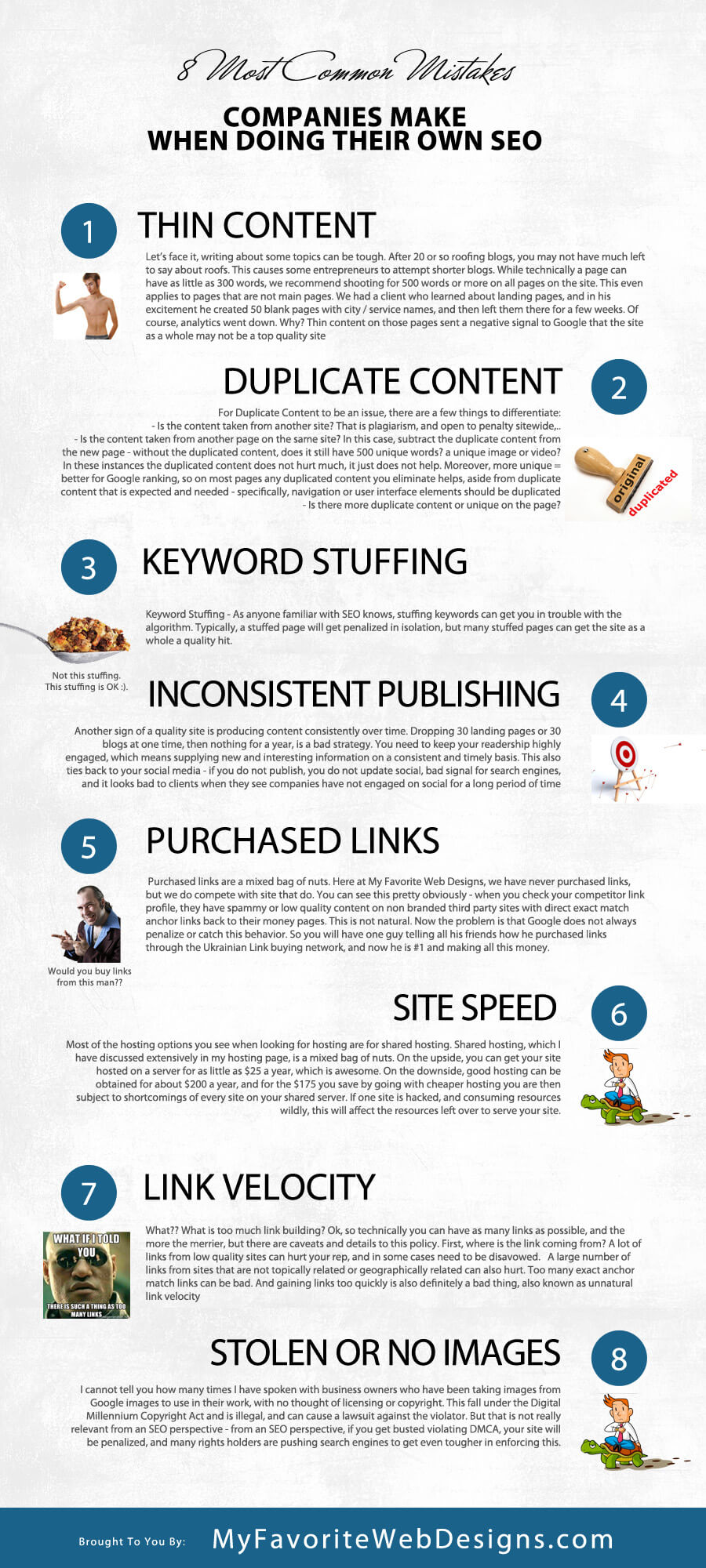
8 Most Common Mistakes Companies Make When Doing Their Own SEO

common mistakes business managers make when doing their own search engine optimization

8 Most Common Mistakes Companies Make When Doing Their Own SEO

As a professional website design and search engine optimization company, we often work with clients to do SEO. A Mesa Arizona SEO company has many components with which it must work, and a key part of the program is content creation. While we do have 2 awesome writers and a crew that is second to none when it comes to creating content for websites, we are still limited by the available data on the topic we are writing about. For this reason, we often work with clients in creating content, and with some clients we even share optimization tasks. Here are the things I most commonly see clients doing that can harm or even fatally kill an SEO campaign:

  1. Thin Content – Let’s face it, writing about some topics can be tough. After 20 or so roofing blogs, you may not have much left to say about roofs. This causes some entrepreneurs to attempt shorter blogs. While technically a page can have as little as 300 words, we recommend shooting for 500 words or more on all pages on the site. This even applies to pages that are not main pages. We had a client who learned about landing pages, and in his excitement he created 50 blank pages with city / service names, and then left them there for a few weeks. Of course, analytics went down. Why? Thin content on those pages sent a negative signal to Google that the site as a whole may not be a top quality site1 – quality sites limit their thin content, as it increases bounce rate. 2
  2. Duplicate Content – Duplicate content is so not understood. The majority of SEO companies do not get it, even Google seems somewhat at odds with their own philosophy from time to time. 3

    For Duplicate Content to be an issue, there are a few things to differentiate:
    – Is the content taken from another site? That is plagiarism, and open to penalty sitewide, particularly if content is copied with no attribution.
    – Is the content taken from another page on the same site? In this case, subtract the duplicate content from the new page – without the duplicated content, does it still have 500 unique words? a unique image or video? In these instances the duplicated content does not hurt much, it just does not help. Moreover, more unique = better for Google ranking, so on most pages any duplicated content you eliminate helps, aside from duplicate content that is expected and needed – specifically, navigation or user interface elements should be duplicated and consistent.
    – Is there more duplicate content or unique on the page?
    – Lastly, even if the content is not duplicated, has the same idea already been talked about on your website? In this instance, one of the pieces of content should rank and not the other, even if the verbiage is totally unique. The Hummingbird algorithm dealt with Google’s handling of concepts as opposed to words and phrases, very interesting. 4 You can see more on some of the penalties out there here on this SEO penalty cheat sheet.

  3. Keyword Stuffing – As anyone familiar with SEO knows, stuffing keywords can get you in trouble with the algorithm. Typically, a stuffed page will get penalized in isolation, but many stuffed pages can get the site as a whole a quality hit.

    I’ll also say keyword stuffing is very 2005. If you understand the concept of long tail keywords, and you have related terms prepared for use, as described in latent semantical indexing, then you would not need or want to repeat the same phrase over and over. Moreover, if Google is now interpreting concepts as opposed to individual words, then concept stuff is the new version of keyword stuff. Like this article which manages to link to like every authoritative article about SEO ever written to this article. 5 6

  4. Inconsistent Publishing – Another sign of a quality site is producing content consistently over time. Dropping 30 landing pages or 30 blogs at one time, then nothing for a year, is a bad strategy. You need to keep your readership highly engaged, which means supplying new and interesting information on a consistent and timely basis. This also ties back to your social media – if you do not publish, you do not update social, bad signal for search engines, and it looks bad to clients when they see companies have not engaged on social for a long period of time.7
  5. Many companies fall into the trap of buying links. Purchased links are a mixed bag of nuts. Here at My Favorite Web Designs, we have never purchased links, but we do compete with site that do. You can see this pretty obviously – when you check your competitor link profile, they have spammy or low quality content on non branded third party sites with direct exact match anchor links back to their money pages. This is not natural. Now the problem is that Google does not always penalize or catch this behavior. So you will have one guy telling all his friends how he purchased links through the Ukrainian Link buying network, and now he is #1 and making all this money. Unfortunately, Google eliminates this type of spam in blocks. So, there may be no penalty for a long time, and then anyone who ever did business with that link selling network suddenly gets nuked off the Google planet. 8 9 10
  6. Another common pitfall for the DIY SEO warrior lies in site speed and hosting selection. Most of the hosting options you see when looking for hosting are for shared hosting. Shared hosting, which I have discussed extensively in my hosting page, is a mixed bag of nuts. On the upside, you can get your site hosted on a server for as little as $25 a year, which is awesome. On the downside, good hosting can be obtained for about $200 a year, and for the $175 you save by going with cheaper hosting you are then subject to shortcomings of every site on your shared server. If one site is hacked, and consuming resources wildly, this will affect the resources left over to serve your site. This becomes most important when considering googlebot crawl. If Googlebot comes to your server, and the server takes 20 seconds to respond due to overload, that is a terrible user experience for the visitors to the site, and Google will look bad if it sends people to a site that does not load. With shared hosting, your site might be good enough 90% of the time, but when you are working on marketing for the web, having your site unuseable 10% of the time is totally unacceptable. 11 12
  7. Too much link building. What?? What is too much link building? Ok, so technically you can have as many links as possible, and the more the merrier, but there are caveats and details to this policy. First, where is the link coming from? A lot of links from low quality sites can hurt your rep, and in some cases need to be disavowed. 13 14 A large number of links from sites that are not topically related or geographically related can also hurt. Too many exact anchor match links can be bad. And gaining links too quickly is also definitely a bad thing, also known as unnatural link velocity. 15
  8. Lack of Unique Rich Media or stolen rich media. I cannot tell you how many times I have spoken with business owners who have been taking images from Google images to use in their work, with no thought of licensing or copyright. This fall under the Digital Millennium Copyright Act and is illegal, and can cause a lawsuit against the violator. But that is not really relevant from an SEO perspective – from an SEO perspective, if you get busted violating DMCA, your site will be penalized, and many rights holders are pushing search engines to get even tougher in enforcing this. It is important and beneficial to have your own unique rich media to accompany your written words. With proper attribution or rights you can certainly make your article better by adding content from third parties on youtube and wiki commons, and you should, but do not rely on copied media for your rich media component, have unique rich media mixed in there as well. 16

common mistakes business managers make when doing their own search engine optimization

[16]

[1] "Fat Pandas and Thin Content – Moz." 2015. 26 Oct. 2015 <https://moz.com/blog/fat-pandas-and-thin-content>

[2] "Thin content with little or no added value – Search Console …" 2013. 26 Oct. 2015 <https://support.google.com/webmasters/answer/2604719?hl=en>

[3] "Duplicate content – Search Console Help – Google." 2013. 26 Oct. 2015 <https://support.google.com/webmasters/answer/66359?hl=en>

[4] "Help me my site is penalized by google recently hummingbird." 2013. 26 Oct. 2015 <https://moz.com/community/q/help-me-my-site-is-penalized-by-google-recently-hummingbird>

[5] "What Is SEO / Search Engine Optimization?." 2010. 26 Oct. 2015 <http://searchengineland.com/guide/what-is-seo>

[6] "SEO: The Free Beginner's Guide From Moz." 2013. 26 Oct. 2015 <https://moz.com/beginners-guide-to-seo>

[7] "What Is The Value Of Social Media Engagement? – Forbes." 2014. 26 Oct. 2015 <http://www.forbes.com/sites/kylewong/2014/05/13/what-is-the-value-of-social-media-engagement/>

[8] "The Private Blog Network Purge – Are You at Risk? | SEW." 2014. 26 Oct. 2015 <http://searchenginewatch.com/sew/how-to/2374165/the-private-blog-network-purge-are-you-at-risk>

[9] "Google Penalizes Blog Networks, Did SEOs Use It To Hurt …" 2014. 26 Oct. 2015 <https://www.seroundtable.com/google-link-network-14932.html>

[10] "Has Google ever busted your Private Blog Network? – BlackHatWorld." 2014. 26 Oct. 2015 <http://www.blackhatworld.com/blackhat-seo/black-hat-seo/671167-has-google-ever-busted-your-private-blog-network.html>

[11] "PageSpeed Tools | Google Developers." 2012. 26 Oct. 2015 <https://developers.google.com/speed/pagespeed/?hl=en>

[12] "Make the Web Faster | Google Developers." 2012. 26 Oct. 2015 <https://developers.google.com/speed/?hl=en>

[13] "Disavow Tool – Google." 2012. 26 Oct. 2015 <https://www.google.com/webmasters/tools/disavow-links-main>

[14] "Disavow backlinks – Search Console Help – Google." 2013. 26 Oct. 2015 <https://support.google.com/webmasters/answer/2648487?hl=en>

[15] "Can You Build Too Many Links Too Fast? Depends." 2014. 26 Oct. 2015 <https://www.seroundtable.com/too-many-links-16282.html>

[16] "Using Photos & Data Under a Creative Commons License." 2015. 26 Oct. 2015 <http://www.seobythesea.com/2015/04/using-photos-data-under-a-creative-commons-license/>

Posted on Leave a comment

Some Of Our Best New SEO Techniques From 2015

Some Of Our Best New SEO Techniques From 2015

This is been a very interesting year for search engine optimization companies in Arizona. Many different changes in the way that Google’s algorithm ranks websites have continued to force the technology of optimizing for that algorithm to evolve. Google has continued to focus on structured data including microdata and JSON. These technologies allow web authors to mark up their content thereby clearly indicating which elements are connected to which other elements.

A good example of this is the markup that goes into images and logos, as well as mentions of company or brand name. There is specific schema markup that is recommended for use when these elements occur so that Google knows you are referencing the company being discussed, and does not confuse the brand name with merely a collection of words and sentence or the logo as simply another image on the page.

The role of social media in a professional level SEO campaign

Other advancements have included optimizing websites for better user experience and mobile experience. Many of us in the Seo community knew that eventually Google would begin to reward well-designed websites, and 2015 marks the year that this has begun. Examples of how this works can be found in the mobile algorithm that was commonly referred to as mobilegeddon. Mobilegeddon was largely marketing on the part of Google, the intention behind it was to for site owners to upgrade their web presence and make it mobile friendly. And in that it was hugely successful. However the name was incredibly overblown as the algorithmic shift was in no way similar to an Armageddon, it simply penalize the sites which had not been designed for mobile or using flash. On the flipside almost any site that was serious about trying to rank prior to this algorithm, had already been optimized for mobile due to the dozens of indications over the past two years that Google is given that this is coming, and because mobile browsing accounts for most 50% of traffic, and not optimizing for that audience would be professional negligence.

With the rise of structured data has emerged the prevalence of websites that are designed to aggregate data for use in Google’s knowledge base. The knowledge base is probably the most relevant advancement in SEO technology in the past two years. One of the main reasons that structured data is now emphasized is so that elements in any website across the web can be correlated directly to items inside of Google’s knowledge base. This data is definitely reinforced by studies done by other SEO entities, such as the 2015 ranking factors study by MOZ or the SEO periodic table distributed by Search Engine Land.

Other things that we have seen devalued include many of the easier or more comment link building strategies, such as social bookmarking or exact match anchor text links. Last year exact match anchor text was penalized in the over optimization penalty, and a common solution was to do branded links with varied achor text. This year we find that context is more important than anchor text itself. For instance does my link to my Queen Creek SEO page exist in the page that does not mention Queen Creek anywhere else? Is it on a page that talks more about web design than it does about search engine optimization? Is the site that it appears on relevant to these topics? And as you can imagine for that reason niche directories have gained prevalence while general directories such as IYP sites have continued to take a hit.

There is more evidence that accompanies activities elsewhere on the web are influencing rankings on the main website. For instance we find that companies that have more reviews rank more easily than companies that never bothered getting reviews. Before in terms of search engine optimization for small businesses, reviews were important in promoting conversion. But now we find that reviews are part of a larger landscape that is taken in context when defining the authority of any given company.

If I had to giv a few recommendations to newer SEO’s or people that were trying to do it themselves without getting too technical, my advice would be this: focus on rich media such as audio and video. Work on custom graphics that are very unique. Make sure that your writing is taking into account the synonyms and vernacular surrounding your main keyword. Do more reverse engineering to find niche directories that are relevant to your specific industry and concentrate on creating good unique content for those properties rather than blasting a multitude of more generalized properties. Make sure your site is mobile friendly and loads fast.

Things we are looking at for the future include the SSL algorithm becoming more forceful and important, more adoption of schema, and more focus on social activity and review activity across the web. We are also paying attention to mobile app development as a ranking factor and of course content length and depth as a factor.

Posted on Leave a comment

Josh Jacoby Discusses SEO Services in Phoenix

Josh Jacoby Discusses SEO Services in Phoenix

Locations that we service

Today we look on video at the differences in services offered by My Favorite Web Designs, such as the packages for SEO and how we deliver that service specifically.

My Favorite Web Designs provides web design and search engine optimization services in the following areas including:

    • Downtown Phoenix
    • South Phoenix
    • North Phoenix
    • Camelback Corridor

service-area-for-web-design-seo

Why hire a local Phoenix Design and SEO company?

The search engine industry is constantly changing its rules which makes it extremely important for small businesses to hire an experienced and reliable SEO company that understands and stays current on the latest SEO developments. Our AZ web design and SEO engages heavily in local SEO using map listings to drive qualified traffic for our clients.

We will create SEO techniques that will gain long term and short term benefits for your business. We can meet you at your local business or anywhere that offers internet access. We work with many small businesses in the Valley and have been building SEO strategies for several years. Call us today to speak to a local Phoenix designer that specializes in SEO and web design.


Video Transcript

Web design in Phoenix Arizona

Josh Jacoby, My Favorite Web Designs:

Phoenix is a very large city and we cover North Phoenix, South Phoenix, Downtown Phoenix, in addition to the Camelback Corridor which is Camelback from about 20th Street up to 48th Street, very common business area in Arizona. We do meetings all over Phoenix. I can meet clients at any Starbucks or any place that has internet access. We’ll also do meetings at your Phoenix business. So, if you’re looking for website design and search engine optimization in Phoenix from a local Phoenix designer, call My Favorite Web Designs, call me, Josh Jacoby, at 480-335-1330.

We are an ideal fit for any AZ business, we are really just a 20 min drive from Tempe, easy to access, easy to

Directions from Downtown to My Favorite Web Designs in East Mesa

Get on I-10 E
5 min (1.5 mi)

Head east on W Van Buren St toward N Central Ave
0.5 mi

Turn left onto N 7th St
0.6 mi

Use the right lane to merge onto I-10 E via the ramp to Tucson
0.3 mi

Take AZ-202 Loop E to E Brown Rd in Mesa. Take exit 26 from AZ-202 S
25 min (27.3 mi)

Merge onto I-10 E
1.0 mi

Use the right 2 lanes to take exit 147A-147B for AZ-202 Loop E
0.4 mi

Keep left to continue toward AZ-202 Loop E
0.3 mi

Continue onto AZ-202 Loop E
21.8 mi

Continue onto AZ-202 S
3.3 mi

Take exit 26 for Brown Rd
0.4 mi

Keep left at the fork, follow signs for Brown Rd E
436 ft

Continue on E Brown Rd. Drive to N 92nd Cir
4 min (1.5 mi)

At the traffic circle, take the 2nd exit onto E Brown Rd
0.2 mi

At the traffic circle, take the 1st exit and stay on E Brown Rd
1.0 mi

Turn right onto N Ellsworth Rd
0.2 mi

Turn left onto E Fairfield St
230 ft

Turn right onto N 92nd Cir
Destination will be on the right

Of course, you can see this on Google maps directly here.

My Favorite Web Designs
1006 N. 92nd Circle
Mesa, Arizona 85207
Office: 480-335-1330

Posted on Leave a comment

New Types of Social Media Accounts

Social Media management in addition to website design for well rounded web marketing programs

New Types of Social Media Accounts

Video Transcript

Josh Jacoby, My Favorite Web Designs:

My Favorite Web Designs is a Mesa, Arizona web design and search engine optimization company. We were founded three years ago in 2009. We’ve done over a hundred WordPress websites and we perform search engine optimization for dozens of clients around Mesa and around the Valley. One of the reasons our service is so effective is that we utilize the WordPress website content management system and that allows us to do search engine optimization very cost effectively and to expand our customer’s websites and ad promotionals and other marketing items very cost effectively.

So, today we’re talking about new types of social media and these are new social media that people are taking advantage of. Some of you may have heard of Evernote and Typepad, and those are two different aggregating social medias, they allow you click different parts of the web, assemble them into notebooks, folders and pertinent collections of relevant data and then share them. And those are two very popular social medias right now. Another type of social media that is up and coming is social media aggregators for your other social media products. What I’m talking about here would be RebelMouse, for instance, and that creates a custom homepage for your brand or company, and that homepage aggregates all the feeds from your Twitter, from your Facebook, from your LinkedIn, and repost them there, so it’s kind of an all-in-one dashboard for your most important social media.

Social Media management in addition to website design for well rounded web marketing programs

And we also just had a new player launched on December 5th and that was So.cl, and that’s Microsoft’s attempt at social networking. So, far it’s not bad. It has some cool items in it that are similar to Pinterest and Typepad. So, we’re interested, we’re on it, we’re checking it out. And if I were you, I would make sure to hop on all your new social media early on, so that you take advantage and are able to get all the contacts and connections that come with being the first in.

Update 2015, October
So, some of the new social media did not really go anywhere, which is a liability when working with social media. After all, it is not like MySpace and Google have not been failing at attempts for years. At present writing, it looks like Google is working to back Google plus out of the integrated space it occupies between drive, photos and maps, so that failure of one does not drive away or drive down the other initiatives. This is really unfortunate for those of us that have embraced those integrations, we are left to wonder what they will take next, what activity we worked so hard on will be deemed obsolete?

When looking for new social networks to establish yourself on, look at the money behind the project, and the relative success of the medium. For instance, Twitter and Linkedin are always safe bets. Instagram and Pinterest have really come into their own, and having a great presence on the sites can significantly help distribute your brand across the web.

Social media, when used in conjunction with website design and marketing like email marketing, can be incredibly effective. If you are considering an AZ SEO or web marketing campaign, you will likely want to see what social media works the best for the demographic you will be targeting!

My Favorite Web Designs
1006 N. 92nd Circle
Mesa, Arizona 85207
Office: 480-335-1330

Posted on Leave a comment

Recommendations When Making A YouTube Video

Recommendations When Making A YouTube Video

cameraman-filming-business-spokesperson

Video is an Effective Marketing Strategy

Adding a YouTube video to your site is a highly effective marketing strategy for search engine optimization because search engines love video content. Keywords in your video will rank higher on major search engines and video is often listed in the top results during search. Additionally, when it is interesting to the viewer it boosts content engagement and user retention. Captivating content doubles the time people spend on your site, increases click through rates from search and a higher number of unique site visits per month generating more leads and higher conversions.

Video marketing increases product purchases because it triggers an emotional response by engaging both visual and auditory senses in the brain. This play on emotions persuades viewers to buy using body language, facial expressions, music, and imagery in your value proposition. Without ever having to step foot into your business, you are establishing a relationship with your customer. A personalized video builds trust and credibility because it creates a human element between the customer and the company’s spokesperson.

Watch our video for a complete explanation:


5 Quick Tips for Video Marketing

  1. Include your company’s spokesperson
  2. Enable links to your website
  3. Verify your YouTube account
  4. Create and upload a manual transcript
  5. Only upload clean video with clean audio

Video Transcript

video-for-recommendations-on-making-youtube-videos-for-your-business
Josh Jacoby, My Favorite Web Designs:

A couple of recommendations when making your YouTube video, make sure that you have, whoever the spokesperson is for your company, in the video for a couple of seconds. Google uses facial recognition technology, so having your spokesperson appear will also get you a little benefit with Google.

Videos integrate perfectly with web design and SEO packages by My Favorite Web Designs, and can be done in conjunction with other marketing services and outlets.

Another benefit that you can take advantage of in YouTube is links within the video to your website, and in order to enable those, you’re gonna have to verify your YouTube account. So, I recommend all YouTube users, go to Features in your Setting, verify your account, and then enable Custom Thumbnails, enable Monetization to become a partner in YouTube. And at that point, you’ll be able to do enhancements, upload longer videos, all types of special features within YouTube, including linking to associated websites, and directly associating your YouTube channel with a brand. And this is a tip that most people don’t realize. After you verify it, go back to your YouTube channel to the Feature section and you’ll see below Features, there is an Associated tab, and that’s the associated website, the website that that channel’s associated with.

Another issue about video that is not commonly understood is the role of the verbiage in the audio track attached to the video. Google attempts to transcribe all the audio that occurs on any of the videos on YouTube. You can see this by going to the transcript section of a video that you have uploaded and you will find that it has created a machine transcript, which is Google’s automatic processing of the audio file into a text file. While the machine transcript often has many errors, you are able to create and upload a manual transcript so that Google can follow along, improve their transcription software, and accurately serve your video to the audience that is searching for it. So be cautious about what audio you use in the video that you display.

Another thing to be cautious of is the quality of the video that you are uploading. Google can easily tell if a video is shaky, low resolution, grainy or poor lighting and will adjust the credit that he gives to that video accordingly. In fact the videos that you create are embedded with metadata that tells Google what type of camera and lens were used in shooting of that footage. There are many signals Google can use to determine the actual quality of the video on YouTube, so while you do not need to go overboard on production quality, clean video with clean audio is recommended for best AZ SEO value.

So, if you’ve not associated your YouTube channel with your website, make sure you verify your YouTube channel and associate it.

My Favorite Web Designs
1006 N. 92nd Circle
Mesa, Arizona 85207
Office: 480-335-1330

Posted on Leave a comment

5 Very Actionable Tips For SEO You Don’t Hear A Lot But Really Should

5 Great Tips For Search Engine Optimization You Don’t Hear A Lot But Really Should

5 Very Actionable Tips For SEO You Don’t Hear A Lot But Really Should

5 Great Tips For Search Engine Optimization You Don’t Hear A Lot But Really Should

1. NOT YO MAMA’s SITEMAPS

Make sure, in addition to submitting a sitemap, you also submit a video sitemap, post sitemap, pages sitemap, sitemapindex, images sitemap, and a gzip formatted sitemap. If you use WordPress this is easy, if you don’t I just feel bad for you right this moment. Here are the plugins, if I am feeling inspired i can install them all and generate and submit all the sitemaps to Google and Bing in 45 minutes to an hour, I cannot even imagine how long it would take without it being automated. You can have the best website designer in AZ, and still need a sitemap for Google to be able to index all your content.

Google XML Sitemaps – creates a regular and gzipped sitemap, has all pages and posts
Better WordPress Google XML Sitemaps – Creates post sitemap, page sitemap, sitemapindex, and can create sitemaps for your media if you let it, but honestly that is typically duplicate content unless you actually put time in on each individual media page, and lets face it, I’d rather do alt tags for a floral wallpaper catalog. UGH!!
Image Sitemaps – pretty straightforward, check it, and ensure all your pages have a pic assigned.

2. Link Up Your Social Media

Set up your Google Plus Personal and Business Accounts, as well as your youtube, linkedin, facebook. Use your exact company name, no keyword stuffing. Link all these to your website, and link them all to each other. Each property should have links to every other social media and your website. Feel free to include niche specific social media such as Behance or Houzz. And before you say anyone does not give you the ability, that is incorrect, there is a way on everyone of these, you just need to find it.

**PRO TIP – if you can’t find any way to link, use barenaked links and citation. Bare naked is just listing the URL in print, and a citation is minimally name, address, phone number (NAP).

3. Google Experiments

Use Experiments in Google Analytics. Identify weak content. Rewrite it. Set up an experiment using the old content as the original and the new content as the variable. You’ll need to set a goal, so that analytics can track success. You used to have to specify a URL based conversion, but they now allow for time on site, which is my favorite, and super easy to set up. After 30 days go back and see if there is enough data to pick a winner.

4. Use Images

Make sure everything has a picture associated with it. This is important, as many social media and other sites want to run your content or teasers, and they feed in the page image, so it is important. It is also the most basic and effective form of media there is, and Google respects that, so make sure each page has at least one image, which is reflected in the image sitemap. Google has a definite algorithm for determining picture quality, so I would advise using stock photos or pro photos, and making sure you serve scaled and optimized images names to reflect what they are, beneficial for cost effective Mesa SEO companies.

5. Free, Awesome, Popular SEO Tools

Try out Traffic Travis, Brandify, and WooRank. All have free versions, all give actionable data that really helps, and can lead to much more onsite optimization tips, useful for any web design expert in AZ.

Published By:
My Favorite Web Designs
1006 N. 92nd Circle
Mesa, Arizona 85207
Office: 480-335-1330
Email: Josh@store.myfavoritewebdesigns.com