Posted on Leave a comment

The Quest for the Best (Long-tail Keyword)

The Quest for the Best (Long-tail Keyword)

The Quest for the Best (Long-tail Keyword)

The Quest for the Best (Long-tail Keyword)

The Quest for the Best (Long-tail Keyword)
Here are some facts on why long-tail keywords work and how to best go about finding them.
Phoenix, AZ

In the world of Search Engine Optimization(SEO), long-tail Keywords are all the rage and for good reason. If you manage to land that one ever elusive long-tail keyword that is unique to the product or service you are selling, you essentially struck gold. However, chances are that you will have to go through quite a few mid- and long-tail keywords in order to figure out which generate traffic you are hoping for.

[jetpack-related-posts]

This does by no means mean that head terms or short keywords are not valuable, in fact, you need a combination of both to generate good leads. The problem with long-tail keywords lies for instance in their need for specificity. While you may search for shoe laces by just generically entering the term “shoelaces”, typing in your search engine the long-tail keyword “pink shoelaces for Adidas sneakers” is quite specific and will lead you to your desired product much faster and on a very direct path that does not involve having to click dozens of suggested links.

It is often a hard sell to clients that targeting specific and less popular keywords will actually benefit them more than using keywords that are already have a high search volume. It seems illogical and yet is a very successful SEO strategy-and it works to boot.

Seattle SEO Jayson DeMers brings up a couple of very interesting facts about long-tail keywords. He cites the trend of using natural speech pattern in search engines along with the fact that those searches are rarely grammatically or orthographically correct for the increased importance of unique and market specific long-tail keyword searches.
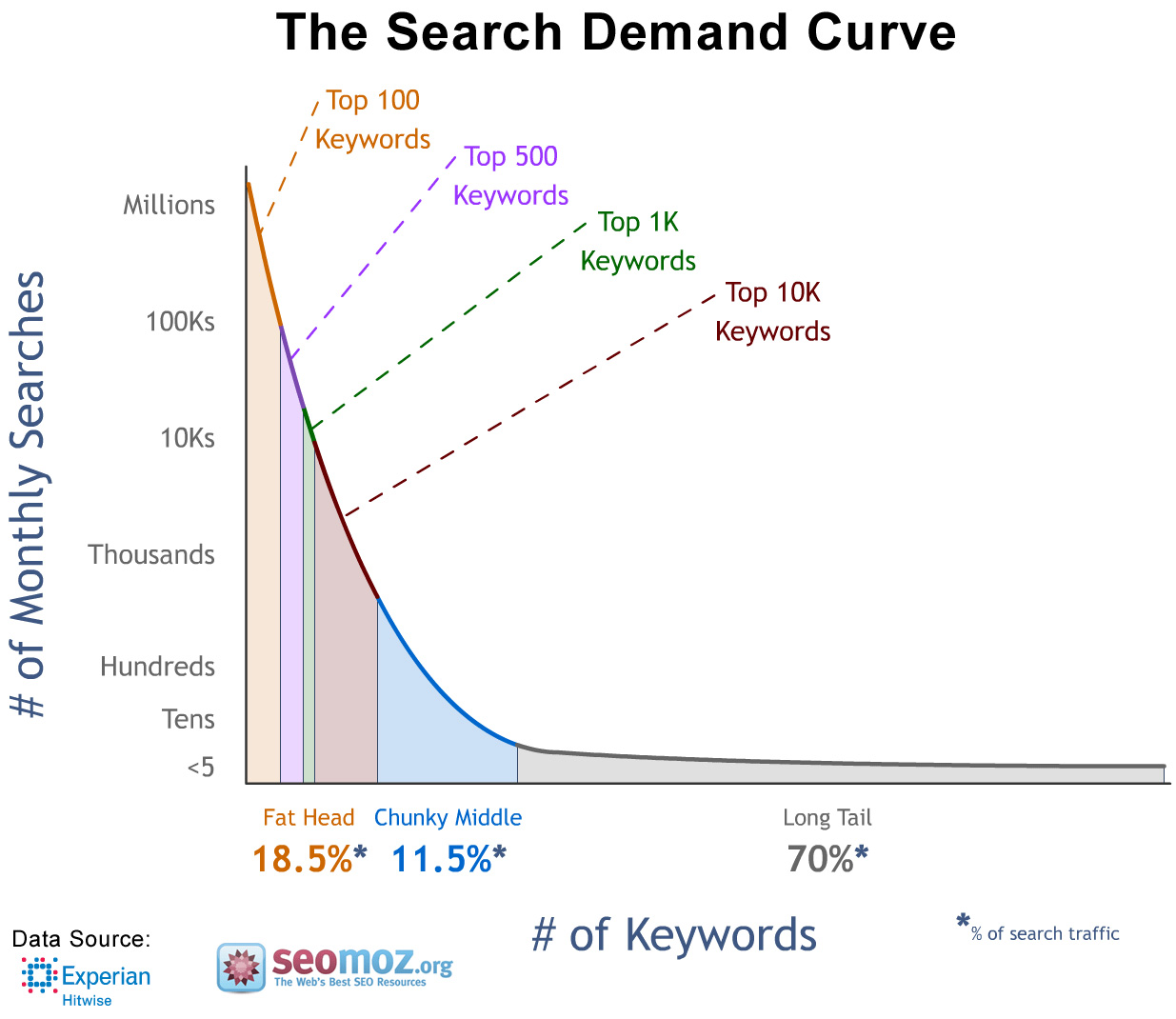
Long-Tail Search and Demand Curve
When perusing the web on tips of how to find the best keywords suggestions reach from simply google, use E-How, yahoo and Quora and other forums for the very specific search terms of potential clients. And oftentimes that is a really good strategy, if you have the time to spend hours and days collecting this data organically and making your own keyword “cheat”sheet and list ranking.

Over the last few years many valuable websites and web services, such as HitTail, have been created by SEO savvy geniuses. These sites are geared towards SEO managers and intend to make our job just a bit easier -and faster.

What exactly is HitTail?

HitTail offers a tracking software service that can help to identify overlooked and less popular long-tail keywords that lead traffic to your client’s website. Through calculations is spits out a number (quite a big number actually) of keywords. You can sign up for a modest $9.95 a month for the basic plan which gets you a website tracking code to embed into your WordPress site. Then the fun begins, you get weekly keyword collections that are broken up in the top 10 search terms which are featured in yellow and long-tail keywords which are in green along with data that tells you how many searches comprised those terms in numbers and percent.
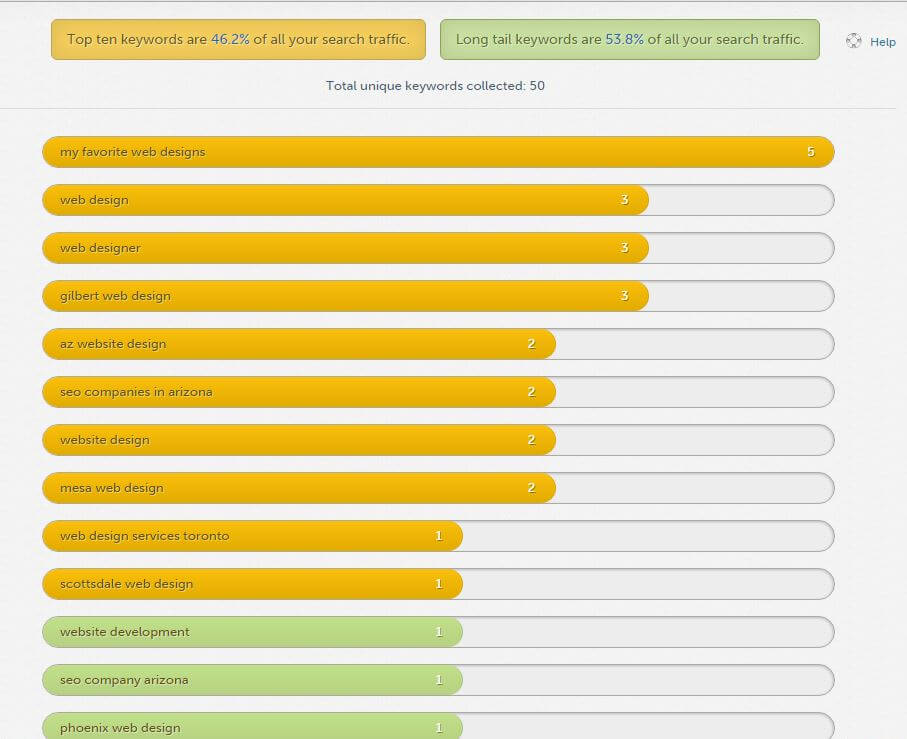
HitTail keyword track list

Additional features include the suggestions tab where you can keywords the HitTail wizards deemed worthy, a to do list tab where you can mark words you want to work with and of course, you can also export your list into an excel spreadsheet.

Help-Suggestions-Bar HitTail
I find it extremely user-friendly and easy to navigate. The Help button even gives you a video explaining how the keyword rankings work and how they are broken up.

With the HitTail keyword analytics you can create a great combination of head terms and long -tail SEO words to maximize website traffic for your business. In fact most businesses have seen an increase of about 20% within the first month of using HitTail.

Ergo: HitTail is definitely worth it. When you ran dry on ideas of what keywords to use or don’t have time to peruse fora and searches, HitTail is the solution for you.

And an added plus, their customer services is prompt and efficient. SEO is a fast paced world and I can’t wait to see what novelties 2016 holds.


Josh Jacoby - Mesa Web DesignerWritten By:
My Favorite Web Designs

1006 N 92nd Cir
Mesa, AZ 85207

Phone: 480-335-1330
Email: Josh@store.myfavoritewebdesigns.com
Website:

Posted on Leave a comment

Why Blog As Part of Your Marketing Plan

Why Blog? As Part of your Phoenix Company's Digital Marketing Plan

Why Blog As Part of Your Marketing Plan

Why Blog? As Part of your Phoenix Company's Digital Marketing Plan

Why Blog As Part of Your Marketing Plan?
While many business owners understand how important a website is to their business, far fewer understand the value of a well maintained blog to their digital marketing success.
Phoenix, AZ

It was shown in studies by the Pew Research Center that as of November 2012, 78% of American adults owned a desktop or laptop computer, by October of 2014, 64% owned a smartphone, and as of January 2014 only 14% of American adults do not use the internet. With the internet having become such a popular option for social activities, information gathering, and shopping, many businesses large and small have created websites to promote their products and services, and even sell their products directly online. In fact, a Washington D.C. based research firm called Clutch performed a survey that showed that 74% of businesses have websites, and another 9% planned to build websites to promote themselves. When business owners without websites were questioned, some responded that their businesses are already maxed out in production or that they were already too busy with the work their businesses already have.

So it’s generally accepted that if you want to grow your business, you need to have a website. But one of the top mistakes that many businesses make is creating a simple template website, posting a few pages of information on it, and never touching it again. Why is this a problem? Static websites that never change rarely rank well on search engines such as Google, Bing, and Yahoo!, and won’t drive traffic to your business. An important aspect of making your website successful is continuing to add new information to your site to continue to bring in new customers and clients, as well as encourage old clients to return. So how do you continually add content to your website? The best way is by blogging. Adding a blog to your website where you frequently add new posts with new and interesting information not only adds that unique content that search engines like so much for their ratings, but they are also a way to interest customers in your services or products, and prove to them before they ever speak to you that you are an expert in your field.

Writing blog posts regularly can improve your Phoenix company's search engine optimization A frequent complaint from small business owners is that they don’t have enough to say to warrant a weekly or bi-weekly blog post about their company. However as noted by serial entrepreneur Francine Hardaway in an article about blogging, if you or someone in your company doesn’t have any information to share, “you’re probably in the wrong business.” Your blog content can be anything that is of relevance to your business or clients. If you are designing a new product, update your current and future customers about improvements or setbacks on your design process, create hype and take pictures along the way, showing glimpses of what the finished product will be. If you are already selling a product, show what uses it can be put to, how clothing can be accessorized, how doodads can be used in different crafts, and the different ways an innovative hand tool or software program can be used. Talk about events you have gone to and the great people you have met, if you’ve learned anything new about your own craft or how learning about someone else’s craft has helped you with your own. If you provide a service to clients, talk about different specific and general ways you can assist them. Let people know when you’ve made a major sale or give “in progress” updates about a big job you’re working on. Offer discounts for mentioning your blog or announce special events going on in your store. Make videos about how to use your products or how effective they can be and post them. Talk about major difficulties people can run into if they don’t use someone in your profession. Discuss studies that have been done in your field and your opinion on controversial topics. There is an unlimited number of topics you can write about in your blog about your business.

Another common complaint about blogging is the time it takes to blog, which is completely true. Blogging takes a small amount of time and you need to commit to doing it regularly to get the most benefit out of it. However, most entrepreneurs spend a large amount of time staying on top of their field already. Learning about new technologies relevant their their field, finding out what competitors are offering, testing out tools or equipment for cost-effectiveness or longevity, creating new products or branching out into new fields of service. If you spend several hours, or more, doing research for your company, then spending another 30 minutes discussing what you’ve learned, conclusions you have come to, and any changes you may or may not be making due to these conclusions, makes for an excellent blog post and shows customers that you’re being proactive in ensuring they get the best service from you. If you attend a professional event or spend several days working on a project, taking a few pictures while you’re there and spending a few minutes discussing what’s going on in those pictures can make an interesting blog post with very little time investment. If you spend hours every week showing customers or potential customers the best ways to use some of your products, taking an hour to make a video showing the same thing and then writing a step-by-step how-to guide to go with it can actually save you time by encouraging people to go watch it online rather than make you explain and reenact it time and again. Likewise, if your customers have questions that you answer time and again, making posts with answers to each of these frequently asked questions can be quick to jot down, and may reduce the number of times you have to repeat yourself every week. Even better, if a potential customer tries to Google one of those questions, your blog is likely to show up in the search results, bringing new leads and more traffic to your website.

So is a blog worth it? Absolutely. As shown in Neil Patel’s Infographic, companies that have blogs have 97% more links that those without and many more indexed pages, which improves search engine results, more than 60% of American consumers have made a purchase after reading a related blog post, more than 80% enjoy reading content from company blogs, and 41% want to be notified by email every time their favorite blogs add a new post. That means your clients want to read about your company, your products, and want to return to your site again and again to read more. And when it’s time for them to make another purchase? Your company is the one making the profit.


Jenna Towe - SEO Operations Manager in Mesa, ArizonaWritten By:
My Favorite Web Designs

1006 N 92nd Cir
Mesa, AZ 85207

Phone: 480-335-1330
Email: Josh@store.myfavoritewebdesigns.com
Website:

Posted on Leave a comment

SEO Tips For Landing Pages That You Can Actually Use

SEO For Landing Pages That You Can Actually Use

Landing page advice is endless, and varied. Much of it centers on horrifyingly boring topic matter like “consider the user interaction flow and how it funnels” or “ask yourself how your audience might view this”. Not that any of that is not valid, it is just pretty obvious, and does not change the way I would design a landing page in anyway, it really just is a thinking exercise that leads not to answers.

Moreover, there is a ton of marketing data out there from Hubspot and other providers who are working with metrics derived from PPC research, and mildly divorced from UI and design best practice, not to mention SEO basics being somewhat absent. Some of the advice is so awful, it needs to be addressed before we even get into how to do it right.

Common Landing Page Advice That Will Hurt Your Site

  • The #1 piece of false advice that circulates is the removal of the primary navigation on a landing page. The thinking is that is the navigation is removed, there is nothing for the customer to do on that page besides funnel and convert.

    This actually confuses two different types of web pages, the landing page discussed here, and the squeeze page. A squeeze page is made to squeeze a visitor to a piece of content or conversion. It is not a landing page, it was made for PPC, and is not recommended anymore, and certainly not for a organic website visitor. Google discusses the need for consistent navigation to simplify the user interactions with a site in their design best practices specs.

  • Another piece of advice not done well is the Call To Action, CTA. Many people believe a CTA, to be a CTA, needs to be very bold or loud, or in a prominent position above the content. That is not to say it cannot be those things, it can and often is loud and upfront, but there is way more to a CTA. Consider a long scrolling page. Should I repeat a phone number every 300 words in bold bright letters? Or would I do better to consider how I do my CTA and where I place it, so as not be obnoxious, and to make the CTA feel organic.

    A really good CTA does not even feel quite like a push in any way. If the landing page is engaging, and I consume the content, their should be info to convert as I go. I would suggest giving multiple avenues to convert. Instead of just a contact form, have a contact form at the bottom, maybe email and phone number at the top and repeated in the middle, some social icons and a call to action “like us on FB” or similar. You can also make your call to action a giveaway sign up or other. Think of going to a furniture store – do you want to talk to the salesman who only wants to make the sale now now now, or do you prefer the salesman who gives you the brochures, talks to you about their products, maybe shows you some pics or a demo video, and then politely asks if you would like to give an email for offers? That is the point on the CTA – be the salesperson you want to be, there is no one right way to do a call to action.

And Now SEO Tips For Your Website Landing Pages

  1. Word Count – Go for 500 words plus, 300 words is bare bare minimum.
  2. Keyword usage. Use your main keyword once in a title, once in context, and use variations throughout. Use words related to your topic – if you are trying to be found for Woodworking, discuss tools used for wood, discuss the finishes, all this has related keywords inherently throughout. You can find more related keywords through research with keyword tools, such as the Adwords Keyword Planning Tool, or services such as Keyword Tool.
  3. Images – you must have one unique image, preferably taken with a cell phone so it is geotagged, and you must have it embedded at a size that is optimized – not browser resized. It should be linked to the large version for display in fancybox or similar JS image enlargement tool, and should be tagged with schema and alt tags to describe the image, the purpose of the image, and the large size of it. You can see more on Schema coding for images here: https://schema.org/ImageObject. Other rules: you should have multiple images to break up your text, so it does not look to dense. The images should be optimized for their size, so they load quickly. Interestingly, the Google pagespeed tool does a better job optimizing images than anything else. On my main landing pages, I use the optimized resources that are given to your for download by the tool, these versions of my images are super efficient and lossless.
  4. Sharing Buttons – Social Sharing should be enabled. This is different than social icons – these are to link to your social media. Share buttons are applets that make the process of sharing an article on your network automatic and easy.
  5. Social Media Links – There are your typical social media, such as FB, linkedin, Google Plus, Youtube, but their are also typically at least one good niche social media per industry. For example, home pro’s have Houzz, Wedding people have wedding wire, Web Designers have Behance, Lawyers have AVVO and so on and so forth. Linking to these is a good move, and builds trust.
  6. Trust Icons – Trust Icons can help people trust your page, increase conversion, and because of that increase SEO value of the page on which they appear. Some examples would be SSL certs, payment processors certs, licenses, BBB, awards, etc… Social Icons also build trust, though they have their own category.
  7. Reviews – More and more people examine reviews to determine the validity of a product or service being offered. Reviews on a product or landing page can increase conversion drastically, and they can be coded with schema to send signals to search engines for quality. A quick note – if you are able to put people’s faces next to the reviews and use full names, do it, builds way more trust.
  8. External Links and Citations – when creating content that imparts a viewpoint or knowledge, there is no better way to build your stature than to quote widely recognized sources for your opinions. By aligning your message with theirs, you become a member of that group, and gain credibility by linking to the source of the information. Make sure the source is relevant to the topic you are writing about, and that it has a good domain authority, and go for it and link.

  9. Rich Media – this means videos, slideshows, infographics, audio, etc… A common method for having this info on your site it to iframe it, also known as embedding it. The common wisdom on iframes in the past has been don’t do it because it is too hard for bots to crawl, but lets look at this. All video served by youtube uses an iframe. That is a google product. I embed slideshows with drive or slideshare, which are both pretty crawlable. The only advice here is to markup your iframes with schema, and use an alt text that would display should the iframe be unable, typically the text between the frame and /frame tags.
  10. Calls To Action – have multiple calls to action, done tastefully, and consider a social call to action.

  11. Useful Information – Make sure you have name, address and phone, but also open hours, payment types accepted, privacy policy link, terms and conditions, pricing or some sort of menu, and links to the blog or relevant blog articles on your site. We use YARRP for related posts, but are definitely interested to do related posts manually, the YARRP algorithm has mixed results, some of the related posts it shows are not that related, though it is way better than not having it.
  12. Social Widgets – supposedly can increase engagement
  13. Author Bio – I recommend having an author bio, and a link to an author page on all blogs. As part of this, there should be a link to your personal google plus profile, we still believe heavily in attribution, and are keeping that strategy alive, we believe there is still a future where experts to gain credibility with search engines.
  14. Without saying, you should test your page for 100% mobile friendliness.
  15. Load Times – More than a second leads to decreases in conversion and engagement. But load times under 1 second can be very, very tough to achieve. I recommend doing the basics, then don’t worry too much about the rest. For instance, Google pagespeed tool always hits me for not leveraging browser caching because some of my external resources that are dynamically loaded are either not caching or not showing as cached. I could spend days finding async scripts, loading locally, modifying plugins to use the async’s, but that takes hours, and basic browser caching take minutes and gives 99% of the benefit. Same with minify – minify what you can, but do not break your site or spend time worry about minifying a file that is causing issues when minified. you also need a consistent server response time, so the loads search engines are seeing are inline with what you see when you test.

In closing, landing page technology is really awesome, and it is still being developed and understood by the marketing community as a whole. These are good basic tips to get your landing page optimized for search engines, but there is a lot more to the field for those who want to take their practice to another level. I will recommend researching:

User Interface Best Practices

http://goodui.org/ – look at site design layouts, and how one layout might perform as opposed to another layout. They advocate cool stuff like shorter forms, single columns and less borders all to encourage consumption and interaction.

https://design.google.com/ – Really quite an ugly uninspiring site for a website that is supposed to teach best practice, but regardless lots of gems in there.
https://developers.google.com/web/fundamentals/design-and-ui/?hl=en – Better looking site for exploring Google UI reco’s.

A/B Split testing

https://www.optimizely.com/split-testing/ – describes what split testing is, and the purpose for it.
https://developers.google.com/analytics/solutions/experiments – A primer on setting up split tests using the Google analytics A/B testing tool, experiments.
https://vwo.com/ab-testing/ – Another good service for split testing, with a good explanation of how it works.

Analytical Analysis

Of course, this will be almost all about Google analytics. Supposedly other services are good too, but analytics is so in depth and so informative, I cannot imagine another tool will be able to exist on a similar level. Some of the things you can do with analytics include:

  • Content Analysis – see what content performs best, and worst. Create additional materials for the strong content, rewrite or fix the weak content.
  • Traffic sources – see where people come to your pages from, and figure out what efforts are most successful for your business.
  • Geo-data – see where your customers are that are finding you
  • Speed data – see the times that are registered for your users to load your site
  • Conversion Tracking – see what causes people to convert
  • Tracking Social Channels – see how your customers engage your social, and figure out where you get the most value for sharing content, and what type of content.

Have any suggestions we missed? I would love to hear from you!

Posted on Leave a comment

How a CRM Can Help Your Social Media Strategy

CRM prospect management for your Mesa, Arizona, social media strategy

How a CRM Can Help Your Social Media Strategy

Social media has become an outstanding force for driving business activity in recent years – but managing social media for a company is no simple task. A social CRM can help turn your prospects into potential sales and clients while limiting the time you spend hunting down sales.

What are the benefits of a social CRM?

A CRM allows you to import your contacts and social media connections into one place, while integrating valuable tools, such as email marketing, social media profiles, Google Analytics, and advertising campaigns.

Many social CRMs also provide auto-updating metrics and reports for email and advertising campaigns, online transactions, and social interactions among followers and market influencers. Lastly, an effective social CRM strategy allows busiensses to rate the “hottness” of prospects through web tracking. Some of the components of prospect tracking include email metrics, clicks on links, registration for newsletters and social media events, conversation and social media activity monitoring. Some CRM platforms then allow businesses to individually connect, message, and monitor communication between prospects – increasing the likelihood of prospect to sale conversions.

Using a social media CRM platform for business sales strategy in Mesa, AZ


3 Social CRMs You Should Consider

1. ZOHO

ZOHO is a cheap social CRM option in comparison to its widely-successful competitor, Salesforce. This platform even offers a free account that provides a vast number of benefits. The ZOHO social CRM integrates with other online applications to provide advantageous tools like website analytics, custom reporting, automation, and territory management. ZOHO also provides Twitter following capabilities for individuals that mention your company. Lastly, the individual social media account engagement has led many users to rate ZOHO highly in comparison to other social CRM options on the market.

Although ZOHO offers a cheap option for businesses looking to engage in social media, it’s low-price quality comes with some downsides. The free system is accompanied with limited customer service assistance. It also has few customization options, which limits the extent to which a company can tailor the CRM to fit their market needs. Most notably, ZOHO falls short in offering integration capabilities with 3rd party sites in comparison to other systems.

2. Nimble

Another popular social media CRM on the web is Nimble. This software system provides abilities to monitor social media activity, directly manage communication, and personally message prospects. Smaller companies may benefit from Nimble, as it provides a more personal approach to prospect tracking. The Nimble social CRM system also lists “Today’s Top Contacts” inside of the platform, allowing business owners to take advantage of the most valuable leads.

While Nimble is a spectacular tool for businesses looking to get active on social media, it lacks the advanced features that many other social CRMs provide. Many users of Nimble have noted the lack of automation abilities, such as drip marketing and auto-social integration. In addition to this, Facebook-friendly users are likely to avoid this system, as it contains limited Facebook features and messaging abilities.
3. Microsoft Dynamics

A newer social media CRM available on the market is Microsoft Dynamics CRM. Dynamics offers a system that showcases social media management. Not only does it allow for advanced social media engagement and posting, but Dynamics allows businesses to track trends and influencers in individual industries. The advanced reporting includes information on social communication per social media platform, geographic activity, and influencer activity. Furthermore, Dynamics offers a thorough keyword-specific focus option that allows businesses to monitor activity per desired territory.

While we find Dynamics to be an incredibly market-changing product, it also comes with significant drawbacks. Dynamics features little 3rd party integrations, which has diverted many users away from this system. It also lacks email tracking and automation that many look for in a social CRM system. Lastly, the learning curve for this product is significantly high, as it requires advanced knowledge and initial market customization that is not highly-desirable among the average user.

CRM prospect management for your Mesa, Arizona, social media strategy


Making your own CRM spreadsheet

If you have searched the CRM market and can’t seem to find the perfect platform, you may consider creating your own CRM for your business. To do so, determine the CRM features that best fit your company’s needs. The most common-sought features include: email marketing campaigns, social media engagement, prospect communication tracking, advanced reports, territorial management, and website analytics.

Google offers a personalized CRM creation tool through Google Drive Spreadsheets. This free option allows businesses and professionals to integrate the most valuable CRM features with Google Analytics in one place. Additionally, a custom Google social CRM is completely customizable to fit your industry, business, your lead market, and even your geographical location.
  • Monitor website traffic through Google Analytics
  • Track social media campaigns, profiles, and advertising effectiveness
  • Integrate marketing (social, blog, or email) campaigns
  • Set up auto-updating reports in your Google Spreadsheet

While a custom-built Google CRM yields great tracking and can increase traffic to your site, the extreme complexity involved in setting up Google Analytic metrics in a Google spreadsheet has limited the use of this method. We hope to see Google Analytics improve their Google Drive CRM integration to reduce the learning curve in the future.
Social CRM’s without a doubt have a positive influence on business activity and potential sales. There are dozens of social CRM software options on the web, but finding the CRM that best fits your company needs is key to playing a social CRM to your benefit. Engaging regularly and personally on social media with your followers is an important Arizona business social marketing strategy for any company, large or small, and helps boost both company reputation and potential SEO effectiveness. Communicating industry and market knowledge, through guest blogging and other tools, and providing company updates online improves the quality of your web presence and overall website ranking.

Posted on Leave a comment

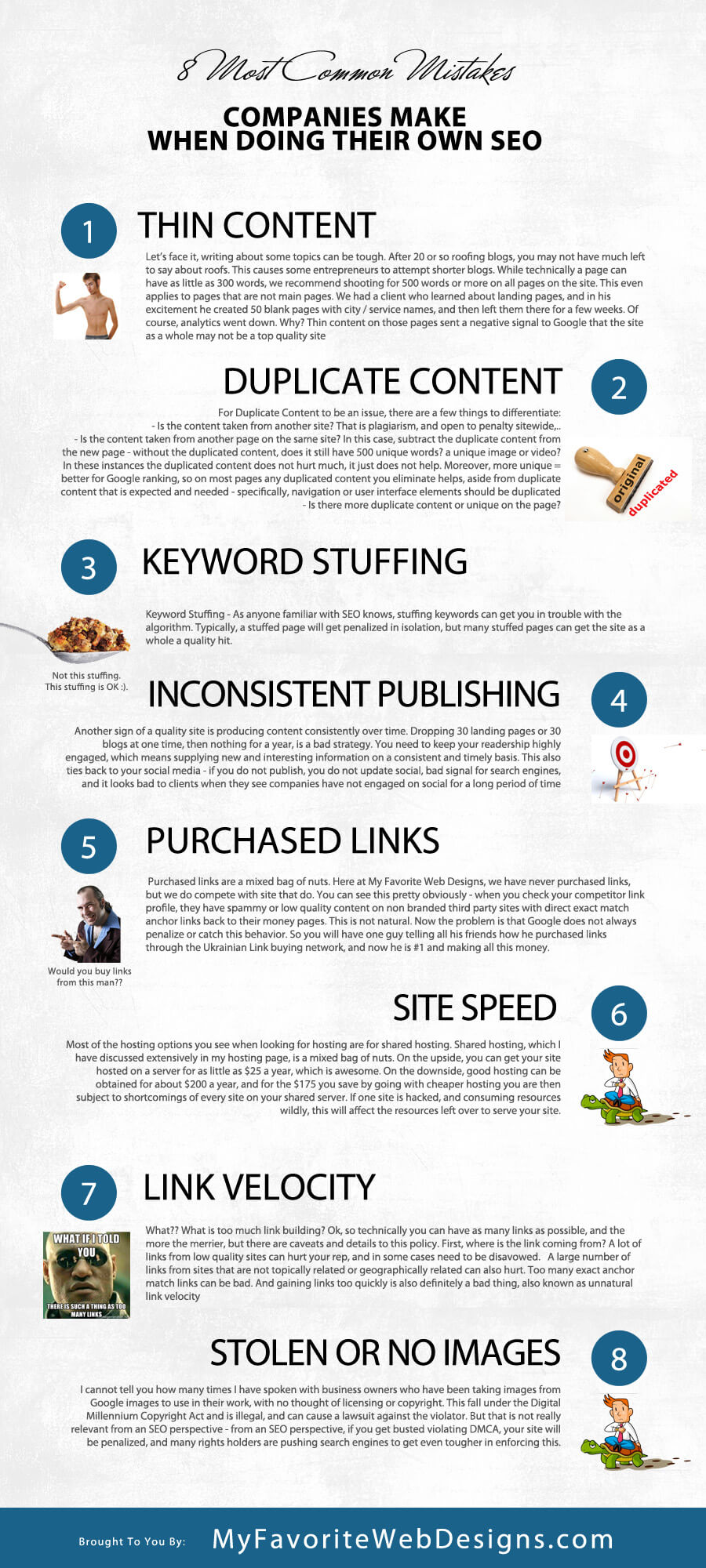
8 Most Common Mistakes Companies Make When Doing Their Own SEO

common mistakes business managers make when doing their own search engine optimization

8 Most Common Mistakes Companies Make When Doing Their Own SEO

As a professional website design and search engine optimization company, we often work with clients to do SEO. A Mesa Arizona SEO company has many components with which it must work, and a key part of the program is content creation. While we do have 2 awesome writers and a crew that is second to none when it comes to creating content for websites, we are still limited by the available data on the topic we are writing about. For this reason, we often work with clients in creating content, and with some clients we even share optimization tasks. Here are the things I most commonly see clients doing that can harm or even fatally kill an SEO campaign:

  1. Thin Content – Let’s face it, writing about some topics can be tough. After 20 or so roofing blogs, you may not have much left to say about roofs. This causes some entrepreneurs to attempt shorter blogs. While technically a page can have as little as 300 words, we recommend shooting for 500 words or more on all pages on the site. This even applies to pages that are not main pages. We had a client who learned about landing pages, and in his excitement he created 50 blank pages with city / service names, and then left them there for a few weeks. Of course, analytics went down. Why? Thin content on those pages sent a negative signal to Google that the site as a whole may not be a top quality site1 – quality sites limit their thin content, as it increases bounce rate. 2
  2. Duplicate Content – Duplicate content is so not understood. The majority of SEO companies do not get it, even Google seems somewhat at odds with their own philosophy from time to time. 3

    For Duplicate Content to be an issue, there are a few things to differentiate:
    – Is the content taken from another site? That is plagiarism, and open to penalty sitewide, particularly if content is copied with no attribution.
    – Is the content taken from another page on the same site? In this case, subtract the duplicate content from the new page – without the duplicated content, does it still have 500 unique words? a unique image or video? In these instances the duplicated content does not hurt much, it just does not help. Moreover, more unique = better for Google ranking, so on most pages any duplicated content you eliminate helps, aside from duplicate content that is expected and needed – specifically, navigation or user interface elements should be duplicated and consistent.
    – Is there more duplicate content or unique on the page?
    – Lastly, even if the content is not duplicated, has the same idea already been talked about on your website? In this instance, one of the pieces of content should rank and not the other, even if the verbiage is totally unique. The Hummingbird algorithm dealt with Google’s handling of concepts as opposed to words and phrases, very interesting. 4 You can see more on some of the penalties out there here on this SEO penalty cheat sheet.

  3. Keyword Stuffing – As anyone familiar with SEO knows, stuffing keywords can get you in trouble with the algorithm. Typically, a stuffed page will get penalized in isolation, but many stuffed pages can get the site as a whole a quality hit.

    I’ll also say keyword stuffing is very 2005. If you understand the concept of long tail keywords, and you have related terms prepared for use, as described in latent semantical indexing, then you would not need or want to repeat the same phrase over and over. Moreover, if Google is now interpreting concepts as opposed to individual words, then concept stuff is the new version of keyword stuff. Like this article which manages to link to like every authoritative article about SEO ever written to this article. 5 6

  4. Inconsistent Publishing – Another sign of a quality site is producing content consistently over time. Dropping 30 landing pages or 30 blogs at one time, then nothing for a year, is a bad strategy. You need to keep your readership highly engaged, which means supplying new and interesting information on a consistent and timely basis. This also ties back to your social media – if you do not publish, you do not update social, bad signal for search engines, and it looks bad to clients when they see companies have not engaged on social for a long period of time.7
  5. Many companies fall into the trap of buying links. Purchased links are a mixed bag of nuts. Here at My Favorite Web Designs, we have never purchased links, but we do compete with site that do. You can see this pretty obviously – when you check your competitor link profile, they have spammy or low quality content on non branded third party sites with direct exact match anchor links back to their money pages. This is not natural. Now the problem is that Google does not always penalize or catch this behavior. So you will have one guy telling all his friends how he purchased links through the Ukrainian Link buying network, and now he is #1 and making all this money. Unfortunately, Google eliminates this type of spam in blocks. So, there may be no penalty for a long time, and then anyone who ever did business with that link selling network suddenly gets nuked off the Google planet. 8 9 10
  6. Another common pitfall for the DIY SEO warrior lies in site speed and hosting selection. Most of the hosting options you see when looking for hosting are for shared hosting. Shared hosting, which I have discussed extensively in my hosting page, is a mixed bag of nuts. On the upside, you can get your site hosted on a server for as little as $25 a year, which is awesome. On the downside, good hosting can be obtained for about $200 a year, and for the $175 you save by going with cheaper hosting you are then subject to shortcomings of every site on your shared server. If one site is hacked, and consuming resources wildly, this will affect the resources left over to serve your site. This becomes most important when considering googlebot crawl. If Googlebot comes to your server, and the server takes 20 seconds to respond due to overload, that is a terrible user experience for the visitors to the site, and Google will look bad if it sends people to a site that does not load. With shared hosting, your site might be good enough 90% of the time, but when you are working on marketing for the web, having your site unuseable 10% of the time is totally unacceptable. 11 12
  7. Too much link building. What?? What is too much link building? Ok, so technically you can have as many links as possible, and the more the merrier, but there are caveats and details to this policy. First, where is the link coming from? A lot of links from low quality sites can hurt your rep, and in some cases need to be disavowed. 13 14 A large number of links from sites that are not topically related or geographically related can also hurt. Too many exact anchor match links can be bad. And gaining links too quickly is also definitely a bad thing, also known as unnatural link velocity. 15
  8. Lack of Unique Rich Media or stolen rich media. I cannot tell you how many times I have spoken with business owners who have been taking images from Google images to use in their work, with no thought of licensing or copyright. This fall under the Digital Millennium Copyright Act and is illegal, and can cause a lawsuit against the violator. But that is not really relevant from an SEO perspective – from an SEO perspective, if you get busted violating DMCA, your site will be penalized, and many rights holders are pushing search engines to get even tougher in enforcing this. It is important and beneficial to have your own unique rich media to accompany your written words. With proper attribution or rights you can certainly make your article better by adding content from third parties on youtube and wiki commons, and you should, but do not rely on copied media for your rich media component, have unique rich media mixed in there as well. 16

common mistakes business managers make when doing their own search engine optimization

[16]

[1] "Fat Pandas and Thin Content – Moz." 2015. 26 Oct. 2015 <https://moz.com/blog/fat-pandas-and-thin-content>

[2] "Thin content with little or no added value – Search Console …" 2013. 26 Oct. 2015 <https://support.google.com/webmasters/answer/2604719?hl=en>

[3] "Duplicate content – Search Console Help – Google." 2013. 26 Oct. 2015 <https://support.google.com/webmasters/answer/66359?hl=en>

[4] "Help me my site is penalized by google recently hummingbird." 2013. 26 Oct. 2015 <https://moz.com/community/q/help-me-my-site-is-penalized-by-google-recently-hummingbird>

[5] "What Is SEO / Search Engine Optimization?." 2010. 26 Oct. 2015 <http://searchengineland.com/guide/what-is-seo>

[6] "SEO: The Free Beginner's Guide From Moz." 2013. 26 Oct. 2015 <https://moz.com/beginners-guide-to-seo>

[7] "What Is The Value Of Social Media Engagement? – Forbes." 2014. 26 Oct. 2015 <http://www.forbes.com/sites/kylewong/2014/05/13/what-is-the-value-of-social-media-engagement/>

[8] "The Private Blog Network Purge – Are You at Risk? | SEW." 2014. 26 Oct. 2015 <http://searchenginewatch.com/sew/how-to/2374165/the-private-blog-network-purge-are-you-at-risk>

[9] "Google Penalizes Blog Networks, Did SEOs Use It To Hurt …" 2014. 26 Oct. 2015 <https://www.seroundtable.com/google-link-network-14932.html>

[10] "Has Google ever busted your Private Blog Network? – BlackHatWorld." 2014. 26 Oct. 2015 <http://www.blackhatworld.com/blackhat-seo/black-hat-seo/671167-has-google-ever-busted-your-private-blog-network.html>

[11] "PageSpeed Tools | Google Developers." 2012. 26 Oct. 2015 <https://developers.google.com/speed/pagespeed/?hl=en>

[12] "Make the Web Faster | Google Developers." 2012. 26 Oct. 2015 <https://developers.google.com/speed/?hl=en>

[13] "Disavow Tool – Google." 2012. 26 Oct. 2015 <https://www.google.com/webmasters/tools/disavow-links-main>

[14] "Disavow backlinks – Search Console Help – Google." 2013. 26 Oct. 2015 <https://support.google.com/webmasters/answer/2648487?hl=en>

[15] "Can You Build Too Many Links Too Fast? Depends." 2014. 26 Oct. 2015 <https://www.seroundtable.com/too-many-links-16282.html>

[16] "Using Photos & Data Under a Creative Commons License." 2015. 26 Oct. 2015 <http://www.seobythesea.com/2015/04/using-photos-data-under-a-creative-commons-license/>

Posted on Leave a comment

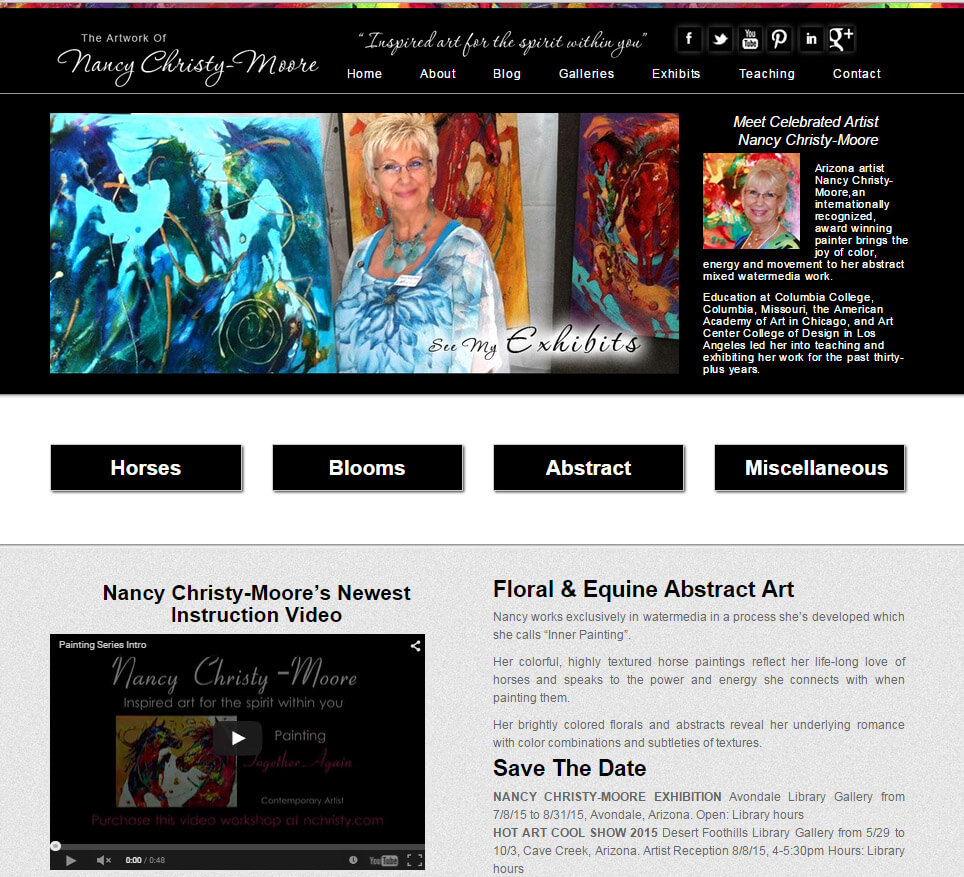
Website designed for an artist In Surprise, Arizona

Site, Graphics, coding all on wordpress content management system. optimized for fast load times and search engine rankings

Website designed for an artist In Surprise, Arizona by My Favorite Web Designs

This website is designed for an artist located in surprise, Arizona. She needed a website that had content management functionality so that she would be able to update her gallery as she completed new works of art. Being an older lady it was important to my client that the system easy to use and that we provide support to show her how to use it.

I knew right away that WordPress was an ideal system for this surprise web design client to manage her gallery, as the ease-of-use and ample available documentation made this an ideal platform to the site’s development. We often have clients that want to manage their websites whether it be editing their own text, blogging, or even creating landing pages and other content for their website. One of the advantages to using My Favorite Web Designs in the creation and maintenance of your web presence is that we provide support to companies and individuals in the form of training so that they are able to take full advantage of the content management functionalities inherent in the WordPress system.

We provided the client with a instructional video that went over the basics of managing her portfolio. This was the perfect medium for this visual artist to consume this information and she was able to duplicate it and to this day performs her own editing. My Favorite Web Designs is able to provide this type of support to any client looking to manage their own website and do their own editing.

The website design employs a customized WordPress theme that is lightweight and built using CSS HTML and PHP to form a efficient base for the site with a small footprint. It is important that the site you get built for your company is created using standards compliant code with no excessive or unnecessary parts. We also form the foundation for our website without using JavaScript as JavaScript is not always supported on mobile devices and does not always work well with all types of browsers on all computers.

Another advantage to a clean coded theme without JavaScript is that it can be updated whenever our client wishes without fear of plug in conflicts with theme coding. Many premade themes are reliant on JavaScript and if the plug-ins for WordPress core are updated without the theme being updated the JavaScript compatibility falls apart and the site renders incorrectly, degrading user experience. For this reason My Favorite Web Designs recommends building websites that are not overly reliant on JavaScript or other more exotic forms of code for their implementation and basic functionalities.

In closing, whether you be an artist in need of a website or a small business looking to establish or improve their web presence, My Favorite Web Designs is an affordable and rewarding choice for your next project. We have the technical aptitude and programming experience to create success for our clients that can translate into conversions and visitors on the web. Our sites are well positioned for search engine optimization in Arizona, and due to their ease-of-use and terrific user experiences can be taken to the top of search rankings with the help of a skilled search marketing professional. If you are considering web marketing or redoing your website please contact Joshua Jacoby the owner of My Favorite Web Designs for a quote on your website whether you are located in surprise Arizona or any other part of AZ.

Posted on Leave a comment

Phoenix Business Web Design And SEO

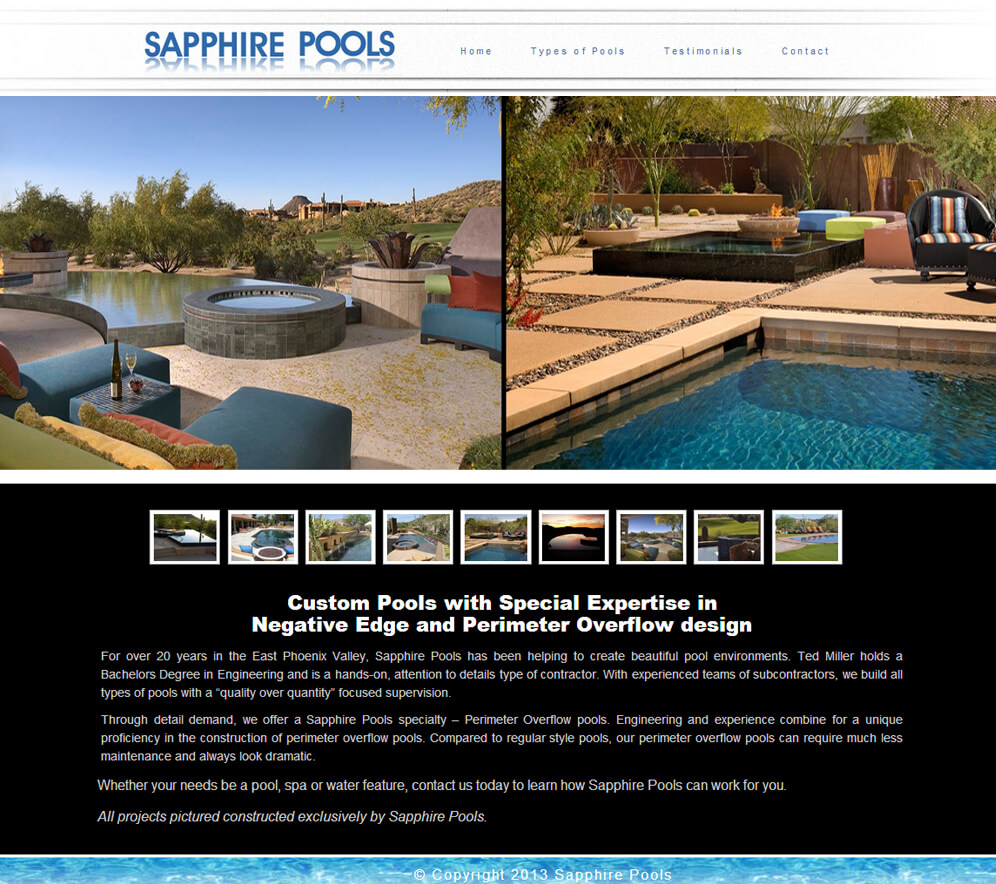
AZ Wordpress website designed for a business broker in phoenix who needed a custom website for his business that was affordable and mobile friendly

Phoenix Business Website Design And SEO Project

This website was designed and coded by hand by Joshua Jacoby, the owner of My Favorite Web Designs, a specialist in websites developed for mobile friendliness and user experience. Created for the owner of a small business in Phoenix Arizona this website is lightweight and efficient, using no more HTML than was absolutely necessary and compliant standard modern CSS3 coding. Websites that have cleanly coded back ends are able to be consumed more efficiently by Google search engines.

The job of a search engine robot is not an easy one. The crawler must spider through pages on websites one after another with the goal of indexing the entire Internet. Imagine the processing power that an enterprise like this required! In order to keep their overhead lower and to make this task more feasible Google requires sites be easy to crawl and light weight so that they do not consume more processing power on the part of the search engine giant that is absolutely required.

Another advantage of this website is its mobile responsive design. Websites that are able to respond to the viewport on which they are being displayed have a huge advantage in user experience. Google likes to display search results that people want to see, and for this reason sites that display well on viewports of varying sizes are boosted more prominently in the search engine rankings. This is just one of the many reasons that any Phoenix Arizona web designer who is working on a website needs to consider the way that it will conform when placed into a smaller viewport.

Many programmers, designers and developers to their mobile websites in different ways. Some use mobile redirect to redirect their users to a different website when they detect a user agent of a mobile device browser. Other web designers use a combination of JavaScript and PHP to serve one set of style files and image files for mobile and another set of style and image files for nonmobile. Neither of these instances is really ideal as it is serving different content to mobile users than is available to desktop browsers which results in the visitors to the website not having access to all the content. We use mobile responsive with CSS breakpoints, which is the recommended method from Google.

On this website we optimized the website for search using the Yoast WordPress SEO plug-in, which does actually have quite a few features that other SEO plug-ins lack. We previously used SEO to ultimate for our optimization by in recent years the Yoast WordPress plug-in has pulled ahead in its development that now offers features such as JSON-LD and other schema.org enhancements that are very useful.

We also incorporated a blog into this Phoenix business website so that the owner would be able to continue creating and disseminating his content via the WordPress content management system. This is an important feature for any business site to have so that the owners and brand managers can continue to push out their message on a continual basis to the public.

Posted on Leave a comment

WordPress web design with e-commerce by woocommerce for Gilbert Arizona business

A wordpress website with e-commerce functionality designed and developed by My Favorite Web Designs for a Gilbert Arizona business

A WordPress Website Designed And Developed With Woocommerce E-commerce Platform For a Gilbert Business

Doing website design for companies that have e-commerce integrated into their website requires more consideration than simply designing a portfolio type site for a small business or promotional site for a new company that is forming. When designing for e-commerce, considerations such as placement of login and logout features and trust building elements should be a part of your initial design criteria.

In addition to building an easy to use navigation structure onto the site that is being designed, the Gilbert website designer must also look at placement for a secondary navigation and think about what navigation might be placed in the footer of the site. The user interface must encourage conversion, which in this case is purchases of the products being offered on the site. In some instances you may want to add products to a cart, and other instances you may want to simply have buy now buttons placed next to products which take the consumer directly to the checkout process.

Woocommerce is an excellent platform for developing an e-commerce store as it is very full-featured and extensible. Woocommerce can be configured to use many different types of currency as the default currency for the store and shipping can be set up internationally using many different arrangements, such as one price for all items in the car together or per item pricing for items in the card. Woocommerce is also compatible with a large number of gateways, in this scenario we configured the QuickBooks payment gateway to work with the store so that the purchases could populate directly to a QuickBooks online set up and recurring billing could be implemented via the QuickBooks online.

Woocommerce is also excellent for search engine optimization. Any site can be optimized so that it is easily consumed search engines when it is running Woocommerce. We integrated the Yoast SEO plug-in, which works well with Woo. It allows us to customize titles and meta-descriptions on a per page basis as well as specify social media profiles and other information directly in a way that is palatable to search engines for improving search engine ranking in Arizona.

This site meets all the criteria that we look for an e-commerce site. It uses a 2048 bit SSL certificate, which stands for secure socket layer, and is a type of encryption that ensures the credit card information being transmitted is unable to be deciphered by hackers or other malicious third parties. If you need a website that is secure and able to process transactions while at the same time being Seo friendly and mobile optimized, then this is a great example of the type of product My Favorite Web Designs can produce for your company.

Posted on Leave a comment

Some Of Our Best New SEO Techniques From 2015

Some Of Our Best New SEO Techniques From 2015

This is been a very interesting year for search engine optimization companies in Arizona. Many different changes in the way that Google’s algorithm ranks websites have continued to force the technology of optimizing for that algorithm to evolve. Google has continued to focus on structured data including microdata and JSON. These technologies allow web authors to mark up their content thereby clearly indicating which elements are connected to which other elements.

A good example of this is the markup that goes into images and logos, as well as mentions of company or brand name. There is specific schema markup that is recommended for use when these elements occur so that Google knows you are referencing the company being discussed, and does not confuse the brand name with merely a collection of words and sentence or the logo as simply another image on the page.

The role of social media in a professional level SEO campaign

Other advancements have included optimizing websites for better user experience and mobile experience. Many of us in the Seo community knew that eventually Google would begin to reward well-designed websites, and 2015 marks the year that this has begun. Examples of how this works can be found in the mobile algorithm that was commonly referred to as mobilegeddon. Mobilegeddon was largely marketing on the part of Google, the intention behind it was to for site owners to upgrade their web presence and make it mobile friendly. And in that it was hugely successful. However the name was incredibly overblown as the algorithmic shift was in no way similar to an Armageddon, it simply penalize the sites which had not been designed for mobile or using flash. On the flipside almost any site that was serious about trying to rank prior to this algorithm, had already been optimized for mobile due to the dozens of indications over the past two years that Google is given that this is coming, and because mobile browsing accounts for most 50% of traffic, and not optimizing for that audience would be professional negligence.

With the rise of structured data has emerged the prevalence of websites that are designed to aggregate data for use in Google’s knowledge base. The knowledge base is probably the most relevant advancement in SEO technology in the past two years. One of the main reasons that structured data is now emphasized is so that elements in any website across the web can be correlated directly to items inside of Google’s knowledge base. This data is definitely reinforced by studies done by other SEO entities, such as the 2015 ranking factors study by MOZ or the SEO periodic table distributed by Search Engine Land.

Other things that we have seen devalued include many of the easier or more comment link building strategies, such as social bookmarking or exact match anchor text links. Last year exact match anchor text was penalized in the over optimization penalty, and a common solution was to do branded links with varied achor text. This year we find that context is more important than anchor text itself. For instance does my link to my Queen Creek SEO page exist in the page that does not mention Queen Creek anywhere else? Is it on a page that talks more about web design than it does about search engine optimization? Is the site that it appears on relevant to these topics? And as you can imagine for that reason niche directories have gained prevalence while general directories such as IYP sites have continued to take a hit.

There is more evidence that accompanies activities elsewhere on the web are influencing rankings on the main website. For instance we find that companies that have more reviews rank more easily than companies that never bothered getting reviews. Before in terms of search engine optimization for small businesses, reviews were important in promoting conversion. But now we find that reviews are part of a larger landscape that is taken in context when defining the authority of any given company.

If I had to giv a few recommendations to newer SEO’s or people that were trying to do it themselves without getting too technical, my advice would be this: focus on rich media such as audio and video. Work on custom graphics that are very unique. Make sure that your writing is taking into account the synonyms and vernacular surrounding your main keyword. Do more reverse engineering to find niche directories that are relevant to your specific industry and concentrate on creating good unique content for those properties rather than blasting a multitude of more generalized properties. Make sure your site is mobile friendly and loads fast.

Things we are looking at for the future include the SSL algorithm becoming more forceful and important, more adoption of schema, and more focus on social activity and review activity across the web. We are also paying attention to mobile app development as a ranking factor and of course content length and depth as a factor.

Posted on Leave a comment

Amy Koch Website Design Project

Custom Real Estate MLS Search Web Design Project For Amy Koch

Website Design Project for Amy Koch

Custom Real Estate MLS Search Web Design Project For Amy Koch

Presenting our latest AZ website design by My Favorite Web Designs, created for Realtor Amy Koch in Arizona. This website uses the flexmls idx plugin, and integrates plugin capabilities with customized and dynamic iframes for populating community and city pages with the appropriate listings. The site was designed with SEO and social media as a chief concern, and takes full advantage of these marketing avenues.

One last item that is nice on this theme – no native javascript or function overrides in PHP, which means the theme can be updated and upgraded until the end of time with no concern of plugins conflicting with the theme itself. (this is becoming a big issue with many themes that try to incorporate everything in the theme, instead of plugging in functionality, as is WordPress’s intent and main advantage).

Thing To Consider When Designing Realtor Websites

Real estate agents often have slightly different requirements for their websites then other types of industries. One of the primary purposes of the websites of real estate agents is to provide a place where their clients can access MLS portal for searching homes. This means that their website needs to be set up to convert, incorporating cost actions and contact forms that allow this type of activity to take place. But it also needs to be set up to encourage browsers to access the search capabilities of the website.

This requires a whole other set of calls to action that need to be placed prominently throughout the user interface. Getting a client to use features on your website can often be tougher than it would seem. Even though you may have a search now button on every page, this may not be enough to actually encourage action. Often a small search form will prompt users to enter information, and sign-ups which have incentives on them can also be a big advantage. For instance, if you are creating a landing page a community, then perhaps on that page you can have a sign-up to notify applicants about new real estate that is being bought or sold in that community.

In closing, you need to determine the objectives that your visitors will need to complete in order to proceed into becoming conversions. With some websites you know that your visitor will need to consume a certain type of information in order to be motivated to purchase or call, with other websites you may get your best activity from funneling users to a video or info graphic with calls to action appropriately placed. I recommend not getting overly caught up in using interstitial’s as these are getting a very negative wrap from Google for lowering the overall quality of the user experience, particularly on mobile devices. You should be able to accomplish the objective for desired activity by setting up your content funnel just right and providing multiple opportunities for your visitors to enter the funnel, but not restricting the user interface to force or squeeze visitors into doing things, this is not good design practice.

View the entire website project at http://amykoch.com!

Posted on Leave a comment

Google Helpouts Really Helpout

**********Update On This Post 10/10/15***********

So, Google has shut down helpouts. Never mind that it was an incredible place to exchange information, promoting cross cultural communication, learning and engagement. Or the fact that they only had it open about 1 year before announcing the shutdown. What a waste. I am actually a member of the Google trusted photographer program as well, which is now being rebranded “street view | Trusted Photographer”, though really it means that it is no longer going to be any barrier to entry, anyone with a cell phone can now do it, sorry if you spent $3000 on equipment for the program.

Long story short, beware what you invest in – many things have short life spans, and are not worth your investment. This really applies to many things – when doing SEO for your AZ Business, do not focus on links, because content is something that will still produce 2 or 3 years from now, but the links or meta tags or other items you optimize with can lose value very quickly, I.E. squidoo, hubpages, both removed mass amounts of links and content, ezine and press releases were devalued, etc…

Really, well done web design in AZ combined with unique rich media is the best investment there is in terms of digital assets.

Google Helpouts Really Helpout

A few months back, I signed up for a new program Google emailed me about called Helpouts. A Helpout is a lot like a Google hangout, but it has a very interesting interface and twist.

To become a helper on Helpouts, one must be an expert in their field, and submit a convincing and compelling listing that demonstrates your expertise is a big part of the acceptance process. You can find the signup for helpouts here: https://helpouts.google.com/pwelcome

As part of the process, you must have a webcam, and will need to do a short intro video for your Helpout. Each listing has its own video, making for some cool content. Be sure to have working webcam and mic going into this.

Each listing has a paid and free option. You can charge whatever price you like per minute or per Helpout, which is a great resource for students and teachers. (why get hours of tutoring when you need 10mins?). As I go through and sign up, I elect to keep my Helpout free intially. My reasoning here is that you get a review for each Helpout you do, and a better reputation should help you to command a better price for your Helpout, so start free and inch up, depending on what the market will bear.

All of the listings are reviewed by the dedicated Helpouts team. In fact, before your listings can go live and you can begin giving Helpouts, the team will need to webchat with you to make sure you are ready to service customers, and that your connection is good. Very cool talking to people at Google directly! They unfortunately would not divulge any secrets related to the algorithm, nor was Eric Schmidt playing dice with Matt Cutts in the background or anything awesome, but still cool!

Helpouts Swag!!

So, as cool as it is to talk to people from all around the globe, live on camera, and discuss technologies about which we are both passionate, but the kicker is that all the Helpouts are able to be recorded! It is not entirely obvious, but as you enter a Helpout, there is a checkbox for “record this Helpout”. So, piece of Swag #1 is the videos you can get from doing them, great content.

Next up is a very special item, which Google emailed me a questionnaire a few weeks back, asking my jacket size. Naturally, I was hoping for a full length leather trench coat like Morpheus had in the matrix, but with a gigantic black and white Google logo on the back. What came was almost equally awesome, and I feel it makes me look kinds like a Google employee, very tempted to take this awesome Google hoodie and try to visit the campus in CA, see where it gets me.

Joshua Jacoby in a Hoodie sent to him by the Google Helpouts team

Posted on Leave a comment

Good Bye WP E-commerce, Hello WooCommerce

Arizona WooCommerce E-commerce Website Development help by Joshua Jacoby!

Good Bye WP E-commerce, Hello Woocommerce!

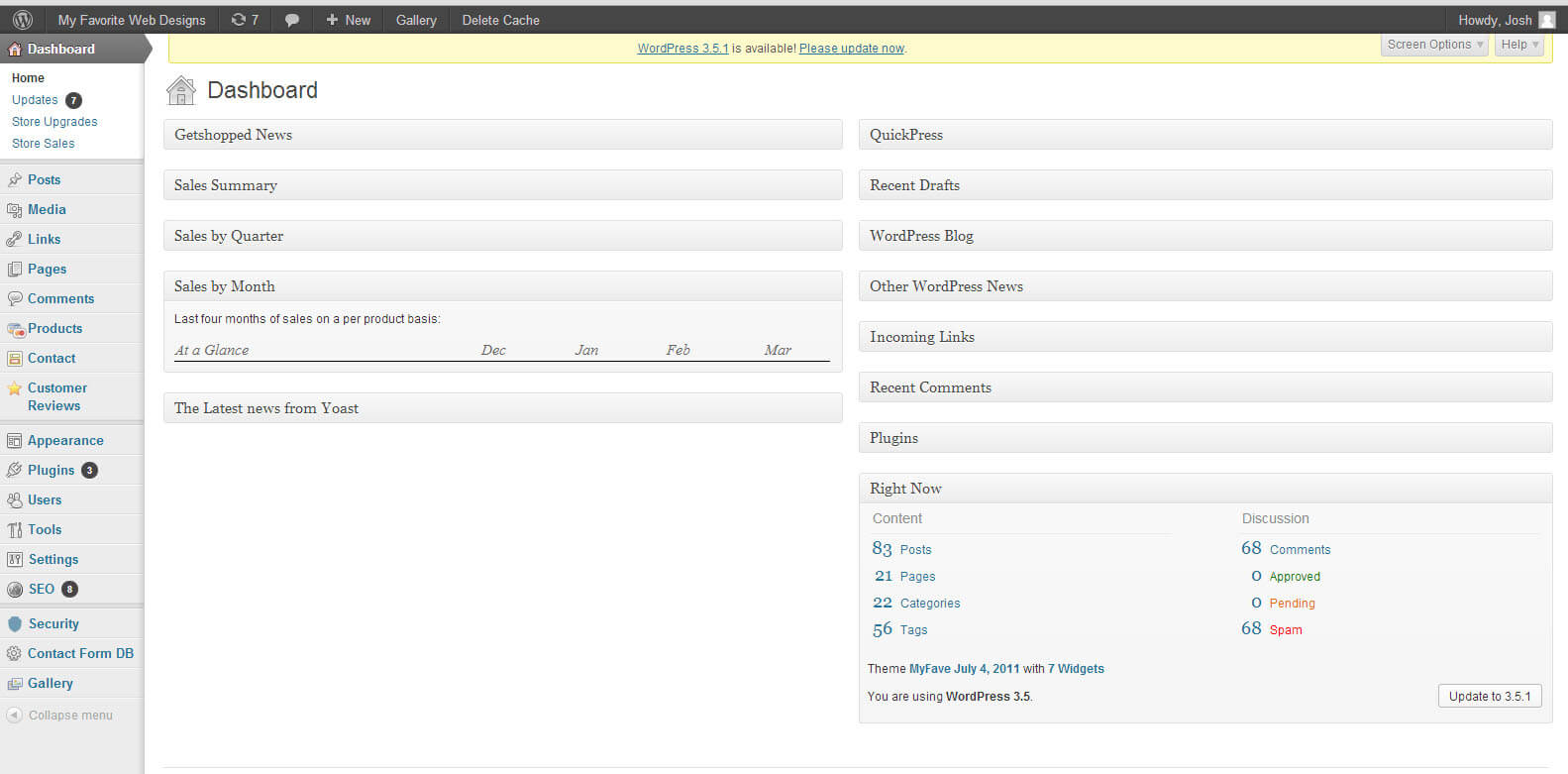
So, let me preface this article by saying that I have been amongst the most ardent of the WP E-commerce devotees. I was rooting for the team at Get Shopped when they had issues going into WP E-commerce versions 3, 3.3, 3.5, 3.7, 3.8 and beyond. It seemed like such a perfect product if only the bugs could be worked out. I invested time into learning their templating system, their shortcodes and common php strings for doing appropriate call in custom template files. I even figured out how to consistently get SSL working without breaking any plugins despite lack of native support for this. It had features that at the time were excellent options for AZ SEO companies, and I was wowed by the results, though this was 2010 and the internet was a different place.

Learning WordPress E-commerce

Now, like all things that come before, it was a great learning experience. By having every single part of E-commerce go wrong at some point, I really was able to learn the nuts and bolts of the E-commerce machine. When I went over to WooCommerce, the templating system took literally 10 mins to learn, the API is super simple and extensible, and everything I needed was available without needing to be custom developed.

To be fair to the poor guys at WP E-commerce and the whole Get Shopped / Instinct family, I did manage to get many years of very good usage from their software once I figured it out. It simply was never without bugs, and certain parts are insanely not obvious to the layman.

Let us take a great example. Variable Products. Variable products are products which have options, like small, medium, and large, or red, blue or green. With WP E-commerce, the options you add to a variable product create product variations, each of which creates its own separate entry on the DB and the sitemap as a distinct URL. The problem becomes when you have a products that comes in 32 colors, with 6 sizes, and 4 materials, and 4 neck style, and shortsleeve or long sleeve. How many variation / entries in our DB did we just create when using WP E-commerce?

The answer is 32 x 6 x 4 x 4 x 2 = 6144 separate products.

So, how could this be managed better? The answer is easy with Woo Commerce. In woo, your product attribute from which the variations are derived, these product attributes can be set display only, or use in creating variation. Moreover, the variation can be set so they only take into account products with different prices, so in the example above the only thing that might affect price above is size, material, short or long sleeve, and neck style. This means:

6 x 4 x 4 x 2 = 192

That is a lot easier to manage, and a lot less work for the DB. For those of you on shared hosting, it also means less out of memory errors. This is one example of where thing are managed more easily with WooCommerce than with WP E-commerce. I have also found the shipping configuration much simpler to manage, and the ajax for managing the products to be far less buggy and more lightweight. All in all, it seems like the Woo team is comprised of more thoughtful developers, though to be fair they did get to learn a lot of hard lessons from work the developers at Get Shopped pioneered, and they benefited from the capabilities that have been extended for Magento over the years, and mirrored for WP.

In closing, Woocommerce is a better platform, it is currently the only WordPress E-commerce solutions I would seriously developing on, it has a very bright future ahead, and the competition is going to have trouble staying monetized while Woocommerce eats their lunch, which may mean they fall farther and farther behind. If you need an Arizona Web Designer who is experienced in E-commerce and WooCommerce, I am an excellent choice for this type of development.

Arizona WooCommerce E-commerce Website Development help by Joshua Jacoby!